
Short answer: To choose a website color scheme for your business, start from your logo colors: one primary brand color, one accent for buttons and links, and two or three neutrals for text and backgrounds. Split them roughly 60-30-10, then test every text and button pair against WCAG 2.2 contrast minimums (4.5:1 for normal text, 3:1 for large text and UI parts).
Key takeaways
- A business palette needs only 3 to 5 colors: primary, accent, and neutrals.
- Your logo is the starting point. The website should match your print, packaging and signage.
- Use the 60-30-10 rule as a starting split, not a law.
- WCAG 2.2 sets 4.5:1 contrast for normal text and 3:1 for large text and interface components.
- Never use color alone to show meaning, such as errors or required fields.
- Keep HEX values for the web and CMYK or Pantone values for print in one brand sheet.
Color is one of the first things a visitor notices on your site. It sets the tone, shows which buttons matter, and tells returning customers they are in the right place. A good palette also makes pages easier to read. This guide walks through a practical way to pick a color scheme for a business website, the rules that keep it readable, and how to keep it consistent with your logo and print work. If you would rather hand it off, our web design team builds palettes as part of every site.
What makes a good business website color scheme?
A good scheme is simple, readable and on-brand. In practice that means a small set of colors, each with a job:
- Primary color: your main brand color, usually from the logo. Used for the header, key headings and brand moments.
- Accent color: a contrasting color reserved for calls to action, links and highlights. If everything is the accent, nothing stands out.
- Neutrals: a dark text color (near-black or deep gray), a white or off-white background, and one light gray for borders and panels.
- Status colors (optional): green, amber and red for success, warning and error messages in forms and checkout.
What should you decide before choosing colors?
Answer these four questions first. They narrow your options faster than browsing palettes.
- Who is the buyer? A law firm client, a parent booking a dentist and a print shop ordering artwork expect different looks. Think about what feels credible in their eyes, not yours.
- What does your brand already use? Logo, vehicle wraps, uniforms, business cards and packaging all set expectations. A website that ignores them feels like a different company.
- What do competitors use? Look at five competitor sites. Note the common colors so you can either fit the category or stand apart on purpose.
- Where will the colors appear? Light and dark backgrounds, photos, social graphics and printed material all need to work with the same set.
How do you pick a website color scheme, step by step?
- Pull your logo colors. Get the exact HEX values from the vector logo file, not a screenshot. If you only have a blurry logo, get it redrawn as a vector first.
- Choose one primary color. Usually the strongest logo color. If the logo has three or four colors, pick the one that reads most clearly on white.
- Choose one accent for actions. Pick a color that contrasts with the primary, often a complementary or split-complementary hue. Use it only for buttons, links and key highlights.
- Add neutrals. Pick a dark text color, a background (white or a warm or cool off-white) and a light gray for borders and cards.
- Build tints and shades. Make 2 to 3 lighter and darker versions of the primary and accent for hover states, backgrounds and charts.
- Check contrast. Test every text-on-background pair and every button against WCAG 2.2 minimums. Adjust shades until each pair passes.
- Mock up two real pages. Apply the palette to the home page and one service or product page. Colors that look fine as swatches often feel loud or dull on a full page.
- Write it down. Record each color’s HEX, RGB, CMYK and (if used) Pantone value and its job in a one-page brand sheet.
Want a site that matches your logo and print colors?
We design and build business websites with a documented palette, accessible contrast and brand colors matched to your logo files. Send us your logo and a few sites you like and we will plan the look with you. Exact quote by email after a short brief · timeline confirmed in your quote.
What is the 60-30-10 rule for website colors?
The 60-30-10 rule is a common design rule of thumb for balancing color. About 60% of what the visitor sees is a dominant color, about 30% is a secondary color, and about 10% is the accent. On most business sites that looks like this:
- 60% dominant: white or off-white backgrounds and large neutral areas.
- 30% secondary: your primary brand color in the header, footer, section bands and headings.
- 10% accent: buttons, links, badges and icons that you want people to click or notice.
Treat the numbers as a starting point. A photo-heavy site may use even less brand color, and a bold brand may flip the dark and light roles. The point is to keep one clear accent so calls to action stand out.
Does color psychology really matter for a business website?

Somewhat, but less than many blogs claim. Colors carry common associations in North American culture. Blue is often linked with trust and calm, green with nature and health, red with energy or urgency. These links vary by culture, industry and personal experience, and they are not reliable enough to promise a sales lift from a color alone.
A safer approach is to use these associations as a tiebreaker. Fit your category first, stay true to your logo, and make the page readable. The table below shows common palette directions by industry, with example sets we put together for this guide. Swap in your own logo colors.
Swipe sideways to see the full table.
| Industry | Common palette direction | Why it is common | Example set (primary, accent, text, background) |
|---|---|---|---|
| Law, finance, insurance | Navy or deep blue with gray and a restrained accent | Reads as stable and formal; common in the category | #1B3A5C #C9A227 #1F2A44 #F7F9FB |
| Healthcare, dental, clinics | Teal or calm blue with lots of white | Clean and quiet; keeps forms and booking easy to read | #0F6E6E #2B6CB0 #1F2A44 #FFFFFF |
| Construction, trades, auto | Charcoal with safety yellow or orange | High contrast, practical, matches workwear and signage | #1E1E1E #F2A900 #E07A1F #FFFFFF |
| Restaurants, bakeries, food | Warm red or orange with cream and brown | Feels warm and appetizing; works with food photos | #C0392B #E07A1F #5A3E36 #FFF8F0 |
| Landscaping, eco, outdoor | Forest green with earth tones | Ties to plants and outdoors without looking clinical | #2D6A4F #B5651D #1F2A44 #FFFFFF |
| Tech, SaaS, agencies | Indigo or violet with crisp neutrals | Modern look; strong accent for sign-up buttons | #3D2C8D #6B4EFF #1E1E1E #FFFFFF |
| Print shops, apparel, promo | Brand blue with a bold orange accent | Lets product photos lead; accent marks the order button | #0B5FA5 #D9480F #1E1E1E #FFFFFF |
We checked the example sets with the WCAG contrast formula. The text colors pass easily on their backgrounds. The accents need care: #D9480F, #B5651D and #E07A1F land between 3:1 and 4.5:1 on white, so use them for large bold button text, borders and icons, not small body text. Gold #C9A227 and yellow #F2A900 fall below 3:1 on white, so use them as button or band backgrounds behind dark text instead.
How do color harmonies help you choose an accent?
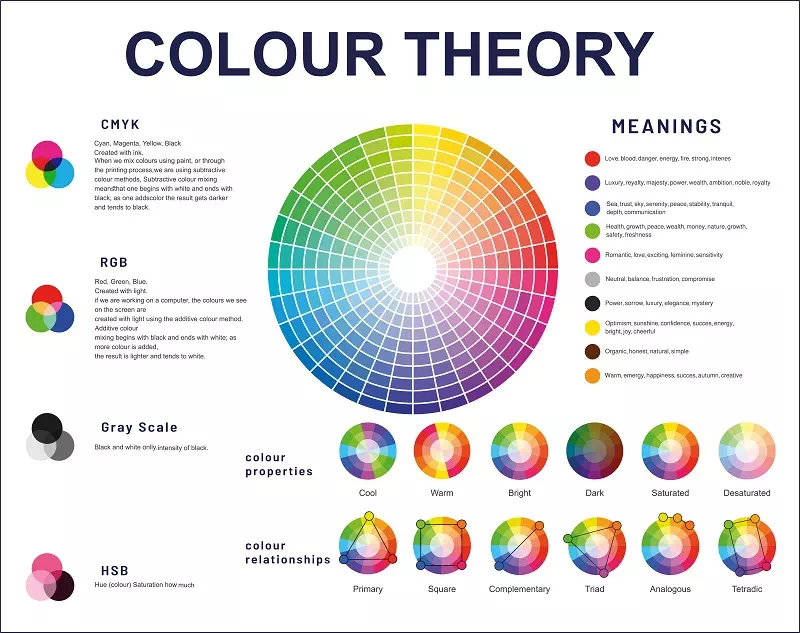
The color wheel shows how hues relate. The traditional painter’s wheel uses red, yellow and blue as primaries; screens mix red, green and blue light. Either way, the wheel helps you find colors that work together. For more background, see our guide to color theory.
- Monochromatic: tints and shades of one hue. Calm and easy, but you still need a contrasting accent for buttons.
- Analogous: neighbors on the wheel, such as blue and teal. Cohesive and soft.
- Complementary: opposites, such as blue and orange. Strong contrast, ideal for a call-to-action accent.
- Split-complementary: one hue plus the two neighbors of its opposite. Contrast with less clash.
- Triadic: three evenly spaced hues. Lively, but hard to keep calm on a business site; let one dominate.
Which colors go where on the page?
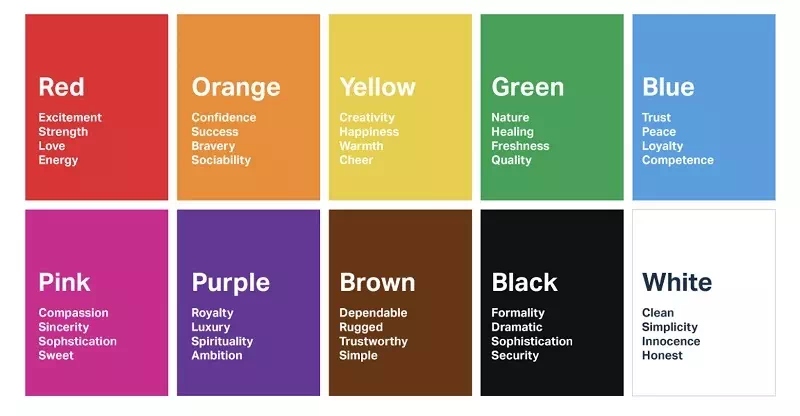
- Background: white or a soft off-white for reading areas. Save dark or brand-colored backgrounds for short bands such as the header, hero or footer.
- Body text: near-black or dark gray, not pure brand color. Long text in bright color tires the eye.
- Headings: dark text or your primary color, if it passes contrast.
- Buttons and links: the accent color, used the same way everywhere, with a visible hover and focus state.
- Navigation: a clear highlight for the current page, plus an underline or shape so it is not color alone.
- Text on photos: add a dark overlay or a solid panel behind the text so it stays readable on any image.
How do you make your website colors accessible?
The Web Content Accessibility Guidelines (WCAG) 2.2 from the W3C set the contrast minimums that are widely used as the benchmark for accessible websites. At Level AA:
Swipe sideways to see the full table.
| What you are checking | Minimum contrast (WCAG 2.2 AA) | Rule |
|---|---|---|
| Normal body text and small labels | 4.5:1 | SC 1.4.3 |
| Large text (18 pt / about 24 px, or 14 pt / about 18.5 px bold) | 3:1 | SC 1.4.3 |
| Buttons, form field borders, focus rings, icons and chart parts | 3:1 against adjacent colors | SC 1.4.11 |
| Meaning shown by color (errors, required fields, links in text) | Color must not be the only cue | SC 1.4.1 |
Small shade changes matter. Using the WCAG formula, mid-gray #777777 on white comes out just under 4.5:1, while #767676, one step darker, just passes. Light gray placeholder text and pale brand colors fail more often than people expect, so check them early.
For Canadian readers: under Ontario’s accessibility law (AODA), public websites of businesses and non-profits with 50 or more employees, and of designated public sector organizations, have had to meet WCAG 2.0 Level AA (with two exceptions for live captions and audio descriptions) since January 1, 2021. There, contrast is a compliance check, not just a design choice.

- Mark errors with an icon and a short message, not only a red border.
- Underline links inside paragraphs, or make them bold as well as colored.
- Label chart lines and map areas directly instead of relying on a color key.
- Check pages in grayscale. If buttons and states still make sense, color-blind visitors can use them too.
- Test hover and focus states, not just the default button color.
How do you keep website colors consistent with your logo and print?
Your website, business cards, signs, shirts and packaging should look like one brand. The catch is that screens and printers handle color differently. Screens mix light in RGB, written for the web as HEX codes such as #1B3A5C. Printers mix ink in CMYK, and many brands also specify spot colors from the Pantone Matching System for exact ink matches.
Pantone publishes guides that pair its spot colors with their closest CMYK, RGB and HTML values. Some bright screen colors cannot be reproduced in CMYK, so pick colors that hold up in both. Our RGB vs CMYK guide explains the difference in detail.
- Start from the vector logo. An AI, EPS, SVG or PDF logo carries exact color values; a JPG or screenshot does not.
- Make one brand color sheet. List each color with HEX, RGB, CMYK and Pantone (if used), plus where it is used.
- Match, then accept small differences. A printed shirt and a phone screen will never be identical. Aim for a close, consistent match.
- Use the same values everywhere online. Website, social graphics, email templates and ads should all pull from the same HEX codes.
A frequent color problem in the files customers send us is a logo that exists only as a JPG or a screenshot, with no recorded color values. Recreating the logo as a vector first gives the web, print and embroidery teams the same exact colors.
How do you apply the palette on your website?

Set the palette once and reuse it. In WordPress, add your colors to the theme or page builder’s global color settings so editors pick from the brand set instead of typing random codes. Developers can store them as CSS custom properties, such as --brand-primary and --brand-accent, so one change updates the whole site. Keep a short style guide with button, link and heading examples. For broader layout and usability tips, read how to create a user-friendly business website.
How do you test a color scheme before launch?

View the mockups on a phone outdoors, on a cheap laptop screen and on a large monitor. Ask a few customers or staff which button they would click first. After launch, watch your analytics for changes in clicks and form submissions. If you run an A/B test on a button color, change only that one thing and let it run long enough to collect real data before you decide.
What can you learn from well-known brand palettes?
Large brands show how a small, consistent palette builds recognition. The notes below are our own observations of their public branding, not statements from the companies, and their sites change over time.
Coca-Cola: red and white
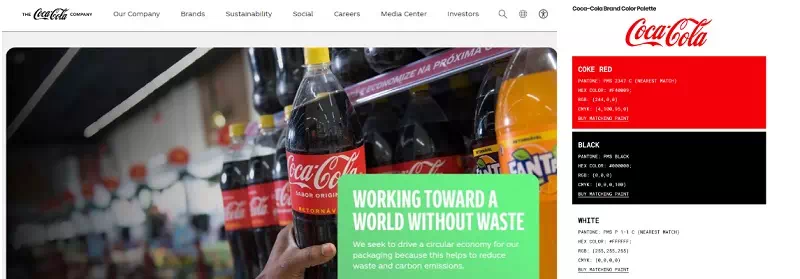
One strong brand red paired with white is used across cans, trucks, ads and the web. The lesson: a single signature color used everywhere does more for recognition than a large palette.
Facebook: blue on light backgrounds

Facebook keeps its blue mostly for the logo, links and key buttons, with large light or neutral areas around the content. The lesson: when users spend time reading, let neutrals carry the page and keep brand color for actions.
Starbucks: green and white

Starbucks green appears in the logo, cups and store signage, and the website repeats it with plenty of white and neutral space. The lesson: online colors that match the physical store make the brand feel consistent.
Amazon: dark navy with yellow and orange accents

Amazon pairs a dark header with a white shopping area and bright yellow and orange buttons. The lesson: a bright accent reserved for buying actions makes the next step obvious on a busy page.
Which free tools help you build a website color palette?
Adobe Color: a web tool from Adobe that you can start using for free. It has a color wheel, harmony-based scheme generation, palette extraction from an image and a contrast checker. You can save palettes to a Creative Cloud library; some features need a paid plan.
Coolors: a palette generator where you press the spacebar to create new schemes. It also offers an image picker that pulls colors from a photo and a contrast checker. The free plan limits how many palettes you can save; the paid Pro plan adds unlimited saves and advanced export options.
Whichever tool you use, paste your exact logo HEX values in first, build around them, and run the final pairs through a contrast checker before you hand them to your developer.
Quick website color checklist
- Primary color taken from the vector logo file
- One accent, used only for buttons, links and highlights
- Dark text color and light background chosen
- All text pairs at 4.5:1 or higher (3:1 for large text)
- Buttons, form borders and focus rings at 3:1 or higher
- No meaning shown by color alone
- HEX, RGB, CMYK and Pantone values recorded in one brand sheet
- Palette saved in the site’s global color settings
Copy this brand color sheet and fill in one row per color. Give it to your web designer, printer and embroiderer so everyone works from the same values.
Swipe sideways to see the full table.
| Color name | Job | HEX | RGB | CMYK | Pantone (if used) | Where it is used |
|---|---|---|---|---|---|---|
| Primary | Header, headings, brand bands | #______ | ___, ___, ___ | __ / __ / __ / __ | _______ | Logo, site header, signage |
| Accent | Buttons, links, highlights | #______ | ___, ___, ___ | __ / __ / __ / __ | _______ | CTAs, icons |
| Text | Body copy | #______ | ___, ___, ___ | __ / __ / __ / __ | n/a | Web, print copy |
| Background | Page and card backgrounds | #______ | ___, ___, ___ | n/a | n/a | Website, email |
| Border gray | Lines, panels, form fields | #______ | ___, ___, ___ | n/a | n/a | Website |
Choosing who builds the site matters as much as the palette. Our guide on how to choose a web design agency covers what to ask before you hire.
Send your logo, get an exact website quote
Share your logo and a short brief, and we will plan an on-brand, accessible color scheme and build the site around it. You get an exact quote by email after a short brief.
- Exact quote by email before you pay (PayPal, Visa or Mastercard)
- Project timeline confirmed in your quote
- 2 free revisions
- 100% money-back guarantee
Business Website Color Scheme FAQ
How many colors should a business website use?
Most business sites work well with three to five: one primary brand color, one accent for buttons and links, and two or three neutrals for text, backgrounds and borders. Add green, amber and red only for status messages.
What colors are good for a business website?
There is no single right set. Navy, teal, green and charcoal are common because they read well and pair with white, but the right choice starts with your logo and your industry. Pick a primary that fits your brand and an accent that contrasts clearly with it.
Should my website colors match my logo exactly?
Your primary color should use the same HEX value as the logo. The rest of the palette can extend it with neutrals, tints and an accent. If the logo color fails contrast as text, keep it for large areas and use a darker shade for text.
What contrast ratio does my website text need?
Under WCAG 2.2 Level AA, normal text needs at least 4.5:1 against its background and large text needs 3:1. Buttons, form borders and icons need 3:1 against the colors next to them.
Why do my website colors look different in print?
Screens use RGB light and printers use CMYK ink, and some bright screen colors fall outside what ink can reproduce. Record CMYK and, if you use spot colors, Pantone values for each brand color so printers can match them closely.
Can I change my website colors without a full redesign?
Usually yes. If colors are set in the theme’s global settings or CSS variables, a refresh can be a quick update. Hard-coded colors spread across many pages take longer to clean up.
Sources
Sources checked October 27, 2026:
- W3C: WCAG 2.2 Contrast (Minimum)
- W3C: WCAG 2.2 Non-text Contrast
- W3C: WCAG 2.2 Use of Color
- Ontario: How to make websites accessible (AODA)
- Adobe Color
- Coolors
- Pantone: Color Bridge Guide
Drafted with AI assistance and checked by our team against the sources listed above on October 27, 2026.