Short answer: Black Friday product photos should be edited, checked and uploaded before sale traffic starts, not during it. In 2026, Black Friday falls on November 27 and Cyber Monday on November 30. Plan to finish edits by mid-November, then run one checklist on every image: pure white main photo, product fill, size, color, crop and file name.
Key takeaways
- Key dates for 2026: Thanksgiving is Thursday, November 26; Black Friday is November 27; Cyber Monday is November 30.
- On Amazon, the main image must sit on a pure white field (RGB 255, 255, 255) with the product filling 85% of the frame.
- Sale text, badges and “free shipping” claims are not allowed in Amazon product images at all, so keep promos in your store banners and ads.
- Shopify suggests 2048 × 2048 px for square product images; Etsy recommends at least 2000 px on each side.
- Start with your top sellers. A late fix on a best-selling listing costs more than a late fix on a slow one.
On this page
- When should Black Friday product photos be finished in 2026?
- What goes on the holiday product photo checklist?
- How do you run the checklist across a whole catalog?
- What image size and format does each channel want?
- Which photo problems show up most in holiday batches?
- Should you reshoot or edit an image before the sale?
- How do you make holiday product photos convert without breaking marketplace rules?
- Frequently asked questions
- Sources
When should Black Friday product photos be finished in 2026?
Finish the images about two weeks before Thanksgiving week. That leaves time for marketplace review, cache refreshes and a second pass on anything that gets rejected. Amazon warns that fresh uploads may need as long as 24 hours before they display, and a rejected main image can hide the listing from search until a compliant one is in place.
Work backwards from the sale weekend. The plan below runs week by week from Monday, October 19.
| Week of (Monday) | Task | Output |
|---|---|---|
| Oct 19 | List every SKU that will be promoted; rank by last year’s holiday sales | A priority sheet with the top 20% flagged |
| Oct 26 | Audit current images against the checklist below | A fix list per SKU (reshoot, edit or keep) |
| Nov 2 | Reshoot the items that cannot be fixed in editing | Raw files for the reshoot list |
| Nov 9 | Edit, color-check and export to each channel’s size | Final image sets, named and sorted |
| Nov 16 | Upload, then check every listing on desktop and phone | Live images, screenshots of each check |
| Nov 23 | Freeze changes; only fix rejections | Stable listings for Nov 27 to Nov 30 |
If your promotion starts before Black Friday, move every row up by the same number of days. The freeze week matters most. Editing images during the sale weekend is how good listings end up with mismatched crops or a missing main image.
What goes on the holiday product photo checklist?
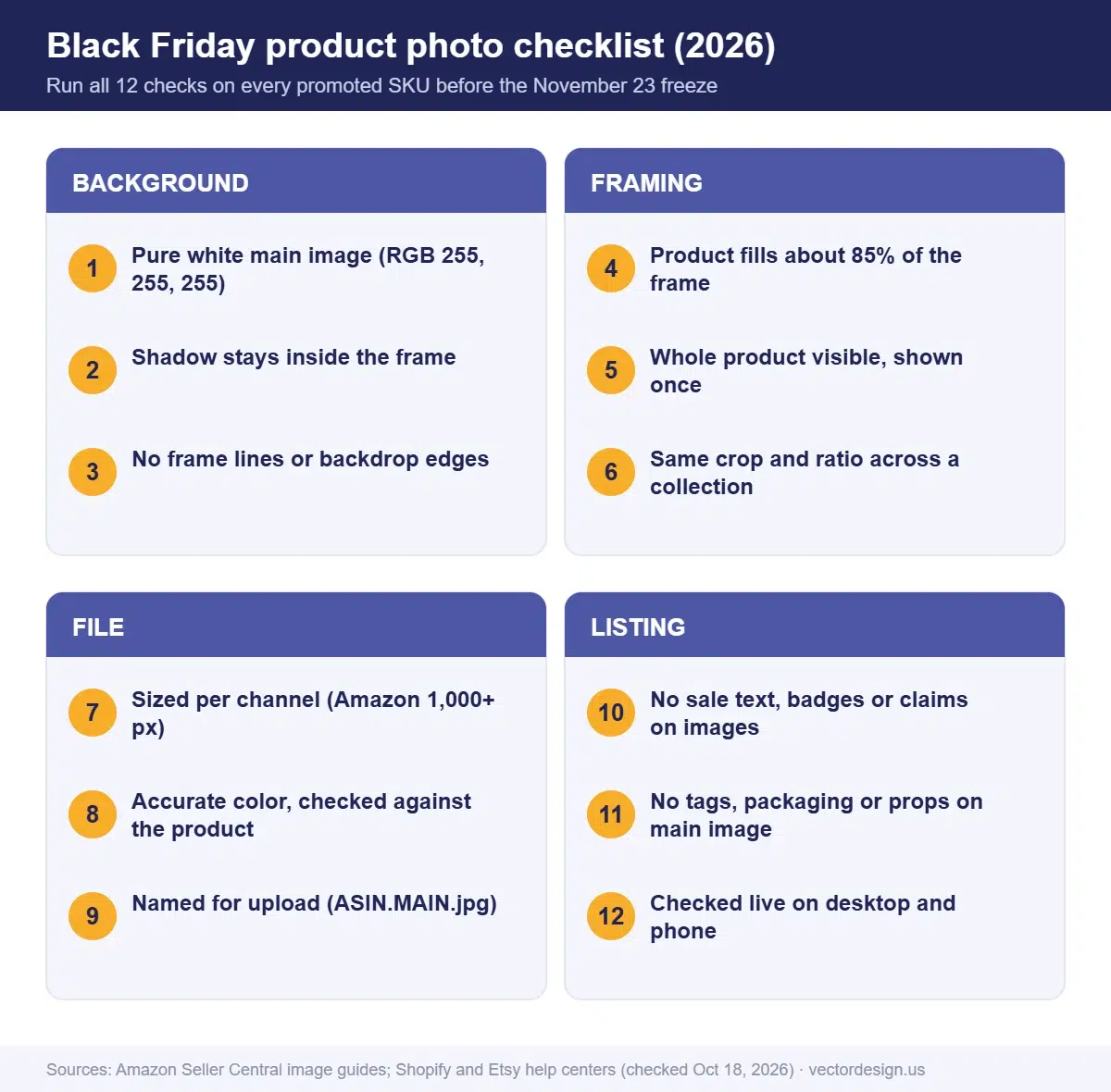
The checklist below covers the problems that most often cost sales or trigger marketplace flags. Run it on the main image first, because that is the photo shoppers see in search results.
| Check | Why it matters | How to check it |
|---|---|---|
| Background is pure white (main image) | Amazon requires RGB 255, 255, 255; off-white looks gray next to compliant listings | Sample the corners and the area near the product with a color sampler |
| Product fills the frame | Amazon asks for 85% fill; small products look weak in search grids | Crop tight, leaving a thin even margin |
| Whole product visible, shown once | Cropped or duplicated views get flagged on Amazon main images | Compare the photo to the physical item |
| No packaging, tags or props on the main image | Amazon lists packaging and tags as suppression reasons | Remove them at the shoot or in editing |
| No sale text, badges or claims | Amazon bans claims such as free shipping in product images | Put offers in store banners, coupons and ads |
| Accurate color | Wrong color leads to returns and complaints | Compare against the product under daylight-balanced light |
| Sharp at zoom | Blur and pixelation are suppression reasons | View at 100% on a large screen |
| Consistent crop and angle across a collection | Mixed ratios make collection grids look messy on Shopify | Use one aspect ratio for every featured image |
| Correct size per channel | Undersized images lose zoom or look soft | Export at the sizes in the next table |
| Clean file names | Bulk uploads to Amazon need the identifier plus variant code | Example: ASIN.MAIN.jpg |
| Secondary images tell the story | Shoppers check size, use and details before buying | Add scale, in-use and detail shots |
| Mobile check | Phone screens shrink and crop images differently from desktop | Open each listing on a phone before the freeze |
Too many SKUs for the time left?
Send us the product photos and we clean the background, add a basic shadow, crop and export to each marketplace size, so your listings are ready before the freeze week.
One simple product per photo (background removal, a basic shadow and light fix, crop and resize): from $0.50 per image. Color fixing for group shots: from $2 per image. Exact price by email once we have seen the photos.
How do you run the checklist across a whole catalog?
A checklist only helps if it is applied the same way to every SKU. These steps keep the work organized when you have hundreds of images.
- Export a SKU list from your store or Seller Central with the current main image URL for each product.
- Sort by revenue. Fix the top sellers first, then the products you will discount most heavily.
- Review the main image of each SKU against the first six rows of the checklist. Mark it keep, edit or reshoot.
- Group edits by type. Background cleanup, shadow fixes, color correction and resizing are faster in batches than one product at a time.
- Export per channel with the correct size and file name, rather than reusing one file everywhere.
- Upload and verify. Check the live listing, not just the upload screen, because some channels crop or compress on display.
- Log what changed with dates, so you can roll back if a new image performs worse.
If you are short on time, steps 3 and 4 are the ones to hand off. Our product photo editing guide explains each edit type in more detail.
What image size and format does each channel want?
Each marketplace publishes its own image rules, and they differ more than most sellers expect. These are the core numbers from each help center, checked October 18, 2026.
| Channel | Formats | Size guidance | Main image rule |
|---|---|---|---|
| Amazon | JPEG (recommended), TIFF, PNG, non-animated GIF | 500 px minimum on the longest side; 1,000 px or more enables zoom; 10,000 px maximum | Pure white background, product at 85% of the frame |
| Shopify | PNG first, then JPEG; also WebP, HEIC and others | Max 5000 × 5000 px (25 MP), file below 20 MB; square photos display well at 2048 × 2048 px | No fixed background rule; keep one aspect ratio for featured images |
| Etsy | JPG, GIF, PNG, SVG, HEIC (no transparent PNG) | At least 2000 px wide and tall; first photo at least 635 px | Landscape or square first photo, with space around the item for thumbnail crops |
Two details trip up sellers every season. On Etsy, any transparent part of a PNG turns black, so export white-background JPGs for Etsy even if you use transparent PNGs elsewhere. On Shopify, mixing square and portrait images in one collection makes cards jump in size, so pick one ratio and crop everything to it. Our marketplace image requirements cheat sheet goes deeper, channel by channel.
Which photo problems show up most in holiday batches?
Every autumn our editors see the same handful of problems in files sent for holiday prep. None of them need a reshoot if they are caught early.
- Near-white backgrounds. Phone apps and quick background tools can leave values such as 245 or 250 instead of 255. The image looks white on its own and gray beside a compliant listing.
- Shadows cut off at the frame edge. Amazon rejects shadows that reach the border of the picture, so a tight crop on a product with a long shadow fails.
- Hang tags and price stickers. They are easy to miss at the shoot and easy to remove in editing, but only if someone looks.
- Last year’s images with old packaging. If the product or label changed, the photo no longer matches what ships.
- Fine edges. Fur trim, mesh, lace and glass need masking rather than a simple cutout. Not sure which cutout a product needs? Read how clipping paths, background removal and masking differ.
Should you reshoot or edit an image before the sale?
Edit when the product itself was captured well and only the surroundings are wrong. Reshoot when the product is out of focus, the color is badly off, or important parts are hidden.
| Problem | Edit or reshoot? | Reason |
|---|---|---|
| Gray or uneven background | Edit | Background replacement is routine work |
| Dust, scratches, small marks | Edit | Retouching removes them cleanly |
| Tags, stickers, packaging in frame | Edit (if the product is fully visible) | The product can be isolated from them |
| Wrong color cast | Edit, if a reference is available | Correct against the real product or a color swatch |
| Out of focus or motion blur | Reshoot | Sharpness cannot be recreated reliably |
| Parts of the product cut off | Reshoot | Editing cannot add missing product detail truthfully |
| Old product version | Reshoot | The listing must show what the customer receives |
How do you make holiday product photos convert without breaking marketplace rules?
Keep the main image strictly compliant and use the secondary images, store pages and ads to sell the season. Shoppers scroll the gallery before they buy, so that is where gift context belongs.
- Gift-ready and in-use shots. Show the product in use, beside its gift box or in a seasonal setting. On Amazon these belong in the extra image slots, because the main image cannot show packaging unless it is a product feature.
- Scale shots. A hand or a familiar object next to the product answers the size question before it becomes a return.
- Bundle and gift-guide images. If a bundle is one listing, photograph exactly what ships together. For store gift guides, put every product on the same background so the page looks planned.
- Promo creatives as separate files. Build sale banners, ad images and email headers apart from the product photos, so you can retire them on December 1 without touching a listing.
- Text on Amazon images. Amazon’s guide lists “No text or pricing details (swatch image only)” among the rules for all product images, and it bans claims such as free shipping. Keep prices, discounts and shipping offers off every image you upload there.
Amazon recommends at least six additional images and one video per listing. Holiday week is a good reason to fill those slots with gift and in-use shots.
How our production team checks this
- We sample the background at the corners and right beside the product before any main image is exported.
- When color matters, we compare the edit against the client’s reference photo or swatch, and ask for one if none was sent.
- We check every export against the channel’s size and file-name rule before delivery.
- A second person reviews each batch before files go back to the client.
- We flag tags, stickers and packaging we find instead of guessing whether the client wants them removed.
Frequently asked questions
Do I need separate image files for Amazon, Shopify and Etsy?
Usually yes. Keep one high-resolution master, then export a version per channel: Amazon recommends JPEG at 1,000 px or larger on the long side so zoom works, Shopify displays square product photos well at 2048 × 2048 px, and Etsy recommends at least 2000 px on each side.
Can I add a “Black Friday sale” badge to my Amazon product image?
No. Amazon’s product image guide does not allow claims, badges or promotional text in product images. Use coupons, deals and ads for sale messaging instead.
Can I reuse last year’s holiday photos?
Yes, if the product, label and packaging have not changed and the images still pass today’s rules. Re-check the background value, the frame fill and any old seasonal text before you upload them again.
Do I need lifestyle images for Black Friday?
Not for compliance: Amazon only requires a compliant main image. It recommends six additional images and a video, and gift-ready or in-use shots in those slots help shoppers picture the product as a gift.
Should my Amazon main image have a holiday background?
No. Amazon’s main image rules require a white field of RGB 255, 255, 255 and forbid added text or graphics. Put holiday scenes, gift wrap and seasonal styling in secondary images and store banners, where they can be swapped back after the sale.
Get your holiday listing images ready
Send your product photos with the marketplace and deadline, and we reply with an exact quote.
From $0.50 per image for a single simple product on a white background; other edits are priced by tier.
- Exact quote by email before any work starts
- Prepayment by PayPal, Visa or Mastercard
- 24-hour standard delivery, rush from 6 hours (extra charge may apply), bulk timing confirmed after file review
- 2 free revisions and a 100% money-back guarantee
Sources
- U.S. Office of Personnel Management, Federal holidays (Thanksgiving Day 2026: Thursday, November 26): https://www.opm.gov/policy-data-oversight/pay-leave/federal-holidays/ (checked October 18, 2026)
- Amazon Seller Central, Product image guide: https://sellercentral.amazon.com/help/hub/reference/external/G1881 (checked October 18, 2026)
- Amazon Seller Central, Image suppression and Non-white background: https://sellercentral.amazon.com/help/hub/reference/external/GT8RSE9S9NK4LP6Z and https://sellercentral.amazon.com/help/hub/reference/external/G75PWC4THA8J269P (checked October 18, 2026)
- Shopify Help Center, Product media types: https://help.shopify.com/en/manual/products/product-media/product-media-types (checked October 18, 2026)
- Etsy Help, Listing image requirements: https://help.etsy.com/hc/en-us/articles/115015663347 (checked October 18, 2026)
Drafted with AI assistance and checked by our team against the sources listed above on October 18, 2026.