Short answer: Artwork requirements for printing come down to five things: a vector or high-resolution file, the finished print size, fonts converted to outlines, the color setup your press uses, and 0.125 inch of bleed when the design runs to the edge. Ask for all five before you quote, using the checklist and email template below.
Key takeaways
- Request the original working file first (AI, EPS, PDF or SVG). A JPG pulled from a website is rarely enough for a large print.
- Ask for the finished size in inches. Resolution only means something once the print size is known.
- Fonts must be converted to outlines, or sent along with the file, so the text prints as designed.
- Adobe calls 0.125 in (3 mm) of bleed standard for designs that run to the trimmed edge; your shop may ask for more.
- Send customers the same checklist every time. It turns art problems into a quick reply instead of a stalled order.
On this page
- What should a customer artwork checklist include?
- Which file type does each print process need?
- How do you check incoming artwork in five minutes?
- What email should you send customers about artwork?
- What if the customer only has a low-res JPEG?
- How should you explain art charges to customers?
- Frequently asked questions
- Sources
What should a customer artwork checklist include?
A good checklist asks for the facts you need to quote and produce the job, in words a customer understands. Keep it to one screen. These are the items we would put on it for a print or decoration shop.
| Item | What to ask the customer | Why it matters |
|---|---|---|
| File type | The original design file: AI, EPS, PDF or SVG | Vector files scale to any size without losing quality |
| Fallback file | If no vector exists, the largest image they have, not a screenshot | Gives the artist the most detail to redraw from |
| Finished size | Width and height in inches, per location (front, back, sleeve, cap) | Sets resolution needs, screen size and stitch count |
| Fonts | Text converted to outlines, or the font files included | Missing fonts get replaced by a default and change the layout |
| Colors | Pantone or brand color codes; the number of ink or thread colors | Decides screens, separations and thread choices |
| Bleed | 0.125 in of artwork past the trim line for edge-to-edge prints | Prevents thin white slivers after cutting |
| Garment or material | Color and fabric of the item being printed | Dark garments may need an underbase; fabric affects detail |
| Quantity and deadline | Number of pieces and the in-hands date | Tells you whether art can wait or must be rushed |
| Proof sign-off | Who approves the proof, and by when | Avoids printing from an unapproved version |
Copy-ready checklist (paste it into your order form, a Google Doc or a reply email)
[ ] Original design file (AI, EPS, PDF or SVG)
[ ] If no vector file: the largest image available, not a screenshot
[ ] Finished size in inches for each print location
[ ] Text converted to outlines, or font files included
[ ] Pantone or brand color codes, and the number of colors
[ ] 0.125 in bleed for anything trimmed to the edge
[ ] Garment or material color and fabric
[ ] Quantity and in-hands date
[ ] Name of the person who approves the proof
Which file type does each print process need?
The right file depends on how the design will be reproduced. A file that is perfect for a DTG printer can be useless for a screen printer, and the reverse is also true.
| Process | Preferred file | Notes |
|---|---|---|
| Screen printing | Vector (AI, EPS, PDF) with spot colors | Each color becomes its own screen, so solid separate shapes matter |
| DTG and DTF transfers | PNG with transparent background at final size | Printful recommends 150 to 300 DPI and warns against semi-transparent edges |
| Embroidery | Vector or a clean, large image | A digitizer turns it into a stitch file such as DST or PES |
| Vinyl cutting and heat transfer vinyl | Vector with closed paths | Cutters follow paths; open or overlapping paths cut badly |
| Offset and digital print | Press-ready PDF with bleed and outlined fonts | Ask the press for its preferred color setup and PDF preset |
| Signs and large format | Vector, or raster at final size per the shop’s spec | Large prints magnify every flaw in a small source image |
| Laser engraving | Vector (SVG, DXF, AI) | Engrave fills and cut lines must be separate |
Embroidery orders differ again: this comparison of DST, PES, EXP and JEF shows what a stitch file is and why a vector logo alone does not run on the machine.
How do you check incoming artwork in five minutes?
Checking art when it arrives, rather than when the job hits the press, saves the most time. This quick routine catches the usual problems.
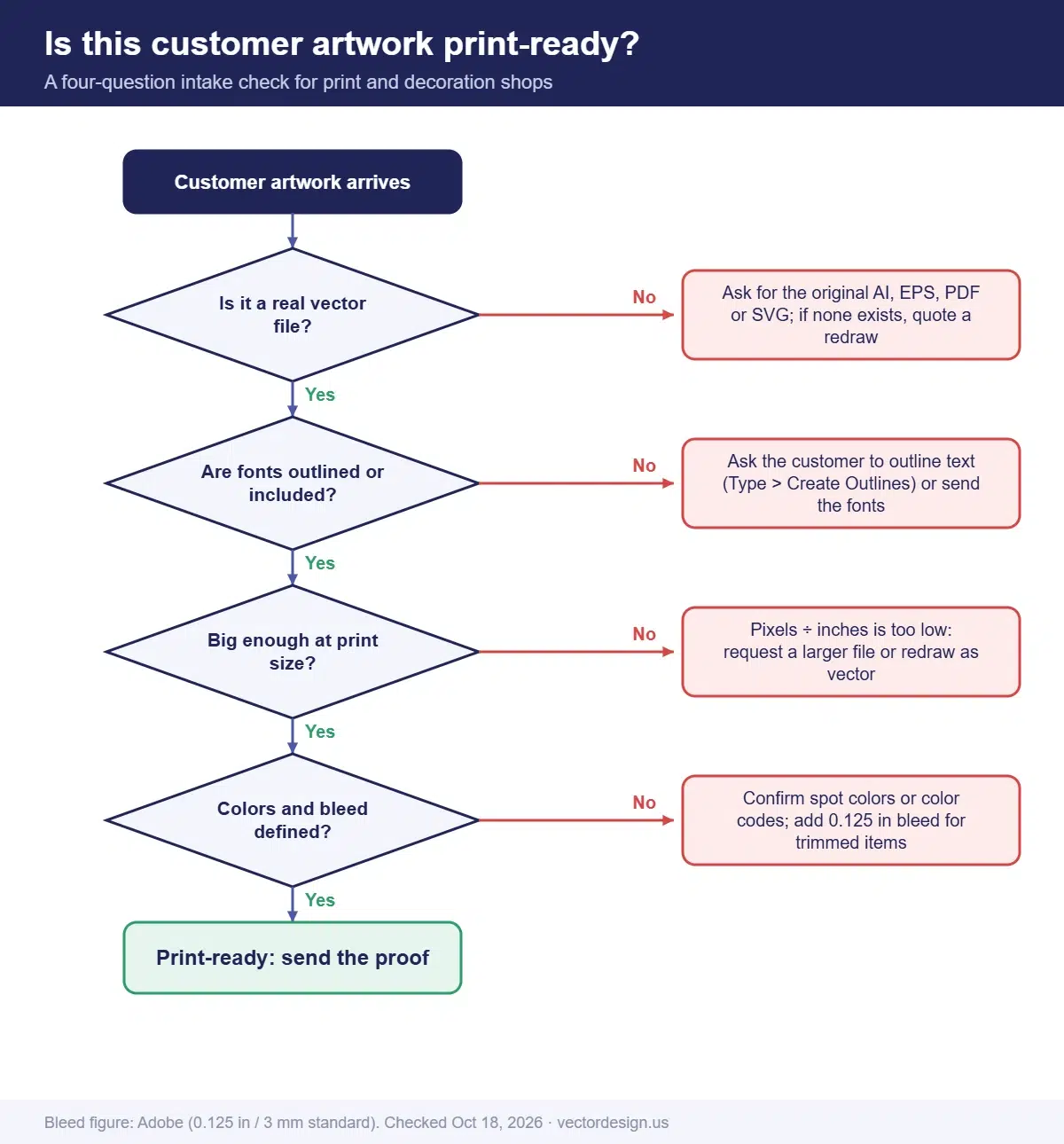
- Check the extension, then distrust it. A PDF or EPS can hold a pasted JPG. The zoom and outline tests in our vector file check guide settle it.
- Zoom to 800% on a curve or small letter. Crisp edges suggest paths; blocks or blur mean pixels.
- Look for live text. Select the text. If it is still editable type and you do not have the font, ask the customer to convert it to outlines. In Illustrator that is Type > Create Outlines.
- Measure against the finished size. For raster files, divide pixel width by print width in inches. A 1,500 px logo printed 10 inches wide gives 150 pixels per inch.
- Count and name the colors. Make sure spot colors are defined, and that near-identical shades are not hiding in the file.
- Check bleed and safe area on anything that is trimmed, such as cards, labels and flyers.
- Reply the same day with a pass, or with the specific item that is missing.
The math in step 4 is the one customers rarely do themselves. A logo that looks sharp on a phone can be far too small for a jacket back.
The check matters most from October to December, the Q4 holiday print rush. For shirts that must arrive before Christmas Day (Friday, December 25, 2026), a file still waiting for a better version in early December can miss the holiday in-hands date. Run this routine the day an order comes in, not the day it is scheduled.
What email should you send customers about artwork?
Send this before the customer uploads anything, or paste it into your order confirmation. It is written for buyers, not designers, and it asks for every item on the checklist.
Copy-paste artwork request email
Subject: Artwork for your order: what we need

Hi [Name],

Thanks for your order. To print it sharp and on schedule, please send the artwork with these details:

1. The original design file (AI, EPS, PDF or SVG). If you used a designer, they will have it.
2. If you do not have that file, send the largest version you can find. Please do not send screenshots.
3. The finished size in inches for each print location.
4. Any text converted to outlines, or the font files.
5. Your brand colors (Pantone or color codes, if you know them).
6. The garment or material color.
7. Your in-hands date (including any holiday deadline) and quantity.

If your logo is only available as a small image, reply and tell us. We can have it redrawn as a clean vector file and will confirm any art charge before we start.

Thanks,
[Your name]
[Shop name and phone]
Keep the tone helpful. Most customers are not designers and do not know what “vector” means. Naming the files they should look for, and where to find them, gets better results than a technical spec sheet.
What if the customer only has a low-res JPEG?
This is the most common art problem in print shops, and it usually has one cause: the customer never received the original files, or lost them. One sign maker on Signs101 summed it up: customers “always seem to lose contact with their designer.” You have three options.
In files sent to us for redraws, the same disguises come up again and again. A JPG logo sits pasted inside an EPS or AI file. A PDF turns out to be a scan. A logo was saved from a social media profile picture. Or the lettering uses a font nobody can name, so it has to be matched or redrawn.
- Ask once more for the source. Suggest places to look: the old designer, the company that made their business cards, their website developer, or an old brochure PDF.
- Print what you have, only for small sizes where the resolution math works, and get written approval for the expected quality.
- Redraw it. Rebuild the logo as clean vector paths, then print. This is the only fix that holds up at large sizes, on screens and on cutters.
Customer sent a blurry logo again?
Pass it to us and we redraw it by hand as separated, print-ready vector art for screens, transfers or vinyl, so the job can move forward.
From $7 per design. We email a firm price once we have looked at the file.
The redrawn file also helps the customer. They can reuse it for every future order, which makes your shop the place that “fixed their logo.”
How our production team checks this
- We open every incoming file in outline view to confirm it holds real paths before we quote.
- We look for linked or embedded images and for fonts that are missing on our side.
- We measure the artwork against the finished size the client gives us.
- We identify or match fonts, and ask the client before substituting one.
- After a redraw, a second person lays the new vector over the original at high zoom before delivery.
How should you explain art charges to customers?
Explain the charge as a one-time fix that the customer keeps, not as a penalty. Customers resist art fees when they arrive as a surprise line on the invoice. They accept them more readily when the fee is quoted before work starts, with a clear reason and a before-and-after.
- Quote it up front, next to the print price, the moment you see the file.
- Show the problem. A zoomed screenshot of the jagged edges explains more than any spec.
- Hand over the file. Tell the customer they will receive the vector file for future use.
- Know your cost. Whether you redraw in-house or outsource, compare the true cost per logo. Our article on vector conversion cost breaks down what drives the price.
For screen printers, the vector art in screen printing guide explains why separated spot-color art matters before screens are burned.
Frequently asked questions
What file format do printers want for a logo?
Most printers prefer a vector file: AI, EPS, PDF or SVG. For DTG and DTF transfers, a PNG with a transparent background at the final print size is common.
What resolution does artwork need for printing?
It depends on the process and the finished size. Printful, for example, recommends 150 to 300 DPI at the actual print size. Vector artwork has no fixed resolution.
Can I print a logo the customer copied from their website?
Rarely at full size. A logo saved from a website is usually a small file made for screens, so it blurs or pixelates when it is enlarged. Ask for the original AI, EPS, PDF or SVG first. If nobody has it, the logo needs to be redrawn as vector art before printing.
Who pays when customer art has to be redrawn?
That is your shop’s policy decision. The fair approach is to quote the art charge up front, next to the print price, agree it in writing before the redraw starts, and give the customer the finished vector file to keep.
Can a JPG be used for screen printing?
Only if it is large and clean enough for the print size and simple enough to separate. Most low-resolution JPG logos need to be redrawn as vector first.
Turn customer art into print-ready files
Forward the file your customer supplied with the print size and ink colors, and we reply with a firm price.
From $7 per design for screen printing art.
- Exact quote by email before any work starts
- Prepayment by PayPal, Visa or Mastercard
- 24-hour standard delivery, rush from 6 hours (extra charge may apply), bulk timing confirmed after file review
- 2 free revisions and a 100% money-back guarantee
Sources
- Adobe, Set print bleed (bleed of 0.125 in or 3 mm described as standard): adobe.com (checked October 18, 2026)
- MOO Help Center, How to create outlines in Adobe Illustrator (Type > Create Outlines): support.moo.com (checked October 18, 2026)
- Printful Help Center, How should I prepare my print file for the best results?: help.printful.com (checked October 18, 2026)
- Signs101 forum, JPEG to vector thread (quoted): signs101.com (checked October 18, 2026)
Drafted with AI assistance and checked by our team against the sources listed above on October 18, 2026.