Short answer: A product photo shadow keeps the item from looking pasted onto white. A drop shadow is a soft offset shape, a natural shadow follows the real light, and a reflection mirrors the product on a glossy surface. Amazon allows minimal shadows on a pure white main image if they stay inside the frame. Shopify and Etsy publish no shadow rule.
Key takeaways
- Three main styles: drop shadow (soft and generic), natural or cast shadow (realistic, follows the light) and reflection (a mirror image for glossy products).
- Amazon wants RGB 255, 255, 255 behind the main image and only a minimal shadow, kept inside the frame and off any backdrop.
- Shopify and Etsy have no published shadow rules, so consistency across your catalog matters more than the style you choose.
- Background removal deletes the original shadow, so plan to keep, rebuild or add one at the editing stage.
- Etsy shows transparent PNG areas as black, so export shadowed images as JPGs on white for Etsy.
On this page
- What are the three types of product photo shadow?
- Drop vs natural vs reflection: which suits which product?
- What do Amazon, Shopify and Etsy allow?
- Should you keep the original shadow or create a new one?
- How do you add a product shadow in Photoshop?
- How do you keep shadows consistent across a catalog?
- Which shadow mistakes make product photos look fake?
- Frequently asked questions
- Sources
What are the three types of product photo shadow?
The three styles differ in how they are made and what they suggest to the shopper. Each one answers the same problem: a product cut out onto pure white can look like it is floating.
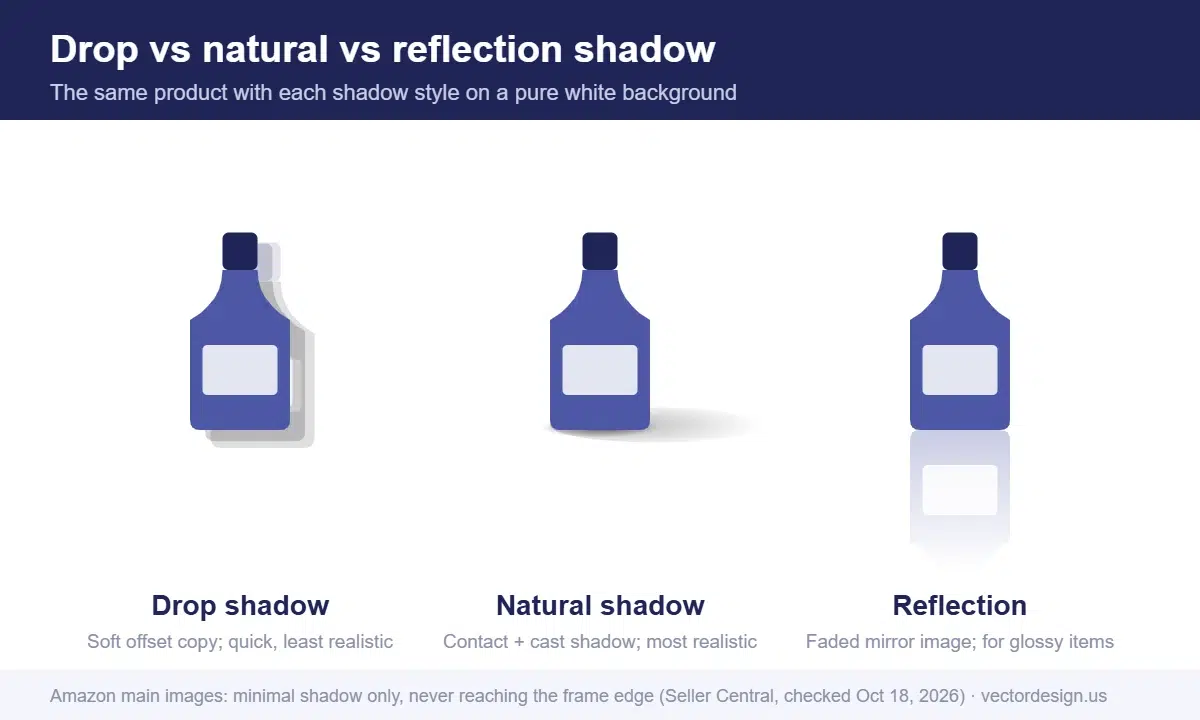
- Drop shadow: a soft, blurred copy of the product’s outline, offset slightly below or behind it. It is quick to make and looks the same on every product, but it is the least realistic.
- Natural shadow (cast or contact shadow): a shadow that matches the light in the original photo, darkest where the product touches the surface and fading outward. It is either kept from the shoot or rebuilt in editing.
- Reflection shadow: a faded, flipped copy of the product below its base, as if it stands on glass or a glossy floor. It suits shiny, premium products and looks odd on soft goods.
Drop vs natural vs reflection: which suits which product?
Choose by product type and by where the image will appear. This table compares the three styles on the points that matter to sellers.
| Factor | Drop shadow | Natural shadow | Reflection |
|---|---|---|---|
| Realism | Low to medium | High | Medium to high on glossy items |
| Best for | Flat items, icons, catalog grids, quick batches | Shoes, bags, furniture, cosmetics, most packaged goods | Watches, jewelry, electronics, glass, bottles |
| Weak for | Products that stand on a base | Very flat items photographed from above | Clothing, soft goods, matte products |
| Editing effort | Low | Medium (high if rebuilt from scratch) | Medium |
| Amazon main image | Fine if minimal and inside the frame | Fine if minimal and inside the frame | Keep it short and subtle so it stays inside the frame |
| Consistency across a catalog | Easy | Needs a fixed light direction | Needs the same angle and fade length |
In our editing work, sellers usually ask for natural shadows on marketplace main images and save reflections for jewelry, watches and electronics. The safest default for a mixed catalog is a soft natural contact shadow with the same direction on every product.
What do Amazon, Shopify and Etsy allow?
Only Amazon writes a shadow rule into its image requirements. Shopify and Etsy leave shadow style to the seller, but their file rules still affect how shadows look.
| Marketplace | Background rule | Shadow rule | What to watch |
|---|---|---|---|
| Amazon (main image) | Pure white, RGB 255, 255, 255 | Minimal shadows around the product are acceptable; shadows that run to the frame edge, or that the product or a model casts on a backdrop, are not allowed | Product must fill 85% of the frame without the shadow reaching the edge |
| Amazon (other images) | Neutral or environment backgrounds allowed | No separate shadow rule | Lifestyle shadows are fine in secondary images |
| Shopify | No fixed rule | No published rule | Use one aspect ratio for featured images so cards line up |
| Etsy | No fixed rule | No published rule | Transparent PNG areas show as black; leave space around the product for thumbnail crops |
Amazon’s non-white background page is the key reference. It also treats a visible frame, line or border at the image edge as a non-white background, so a shadow cropped hard against the frame edge can fail for two reasons at once. If a listing is already flagged, our guide to fixing an Amazon main image that is suppressed walks through each reason.
Size and format rules for each channel live in our marketplace image requirements guide.
Should you keep the original shadow or create a new one?
Keep the original shadow when the product was shot well on a white sweep and the shadow is soft and clean. Rebuild or add one when the original is messy or gone.
- Keep it when there is one soft shadow under the product, the background around it is already close to white, and you only need to clean the edges.
- Remove and rebuild it when the studio lights created two or three overlapping shadows, the shadow falls on a wrinkled backdrop, or it runs off the frame.
- Create one whenever the background has been removed. Background removal takes the original shadow away with the backdrop, and the product will look like a sticker without a new one.
The method used to cut the product out matters too. A clean path keeps the base edge crisp so the shadow can sit right under it. Which cutout to use depends on the edges; this clipping path vs masking comparison helps you choose.
How do you add a product shadow in Photoshop?
Each style takes a few steps. Put the product on its own layer above a pure white background before you start.
Drop shadow
- Select the product layer in the Layers panel.
- Click the fx menu at the bottom of the panel and choose Drop Shadow.
- Set Opacity, Angle, Distance, Spread and Size. Adobe describes Angle as the direction of the imagined light, and Spread as how harsh or soft the edge is.
- Keep Distance small and Size soft for products. Large, dark offsets look dated.
- Turn on Use Global Light so every shadow in the file uses the same angle.
Natural cast shadow
- Select the product and copy it to a new layer below the product.
- Fill the copy with black.
- Use Free Transform to lay it down in the direction the light came from.
- Blur it, as Adobe suggests, with Motion Blur and then Gaussian Blur.
- Add a layer mask and brush it so the shadow is darkest at the contact point and fades away from the product.
- Paint a small, darker contact shadow right under the base on a separate layer. It is what makes the product look grounded.
Reflection
- Duplicate the product layer and flip the copy vertically.
- Line up its base with the bottom edge of the product, so the two touch.
- Lower the opacity and add a gradient mask so the reflection fades out quickly.
- Keep it short. On an Amazon main image, the reflection must stay well inside the frame.
These steps are simple on a box. They get hard on products with gaps, straps, legs or transparent parts, where the shadow has to pass through and around the object. That is usually when sellers send the files out.
Shadows looking fake or uneven across your catalog?
We create natural, drop or reflection shadows by hand on their own layer, matched to your lighting and consistent across every product.
From $0.50 per image for a simple drop or natural shadow. The firm price comes by email after a look at your photos.
How do you keep shadows consistent across a catalog?
Write the shadow down as a short spec, then apply it to every product. Consistency is what makes a category page look professional, whichever style you choose.
- Light direction: for example, light from the upper left, so shadows fall to the lower right.
- Style: natural contact shadow, drop shadow or reflection, chosen per product type rather than per photo.
- Opacity and softness: record the values you used, such as the layer opacity and blur amount.
- Length: keep shadows short enough to stay inside the frame on every crop you export.
- Saved presets: save the drop shadow as a layer style and record the steps for cast shadows as a Photoshop action.
Share the spec with anyone who edits your photos, including outside editors, so new products match the old ones.
If you are refreshing images for Black Friday (Friday, November 27, 2026), lock the shadow spec before the batch starts, ideally by early November. A sale collection page shows dozens of products side by side, so mixed shadow styles are easy to spot there.
How our production team checks this
- We match the shadow direction to the highlights already in the photo before drawing anything.
- Shadows go on their own layer, so the client can adjust or remove them later.
- For marketplace main images, we check that no shadow reaches the edge of the frame after the final crop.
- On a catalog job, we apply one written shadow spec to every file and compare the first few results side by side.
- A second person reviews the batch at full size before delivery.
Which shadow mistakes make product photos look fake?
Most fake-looking shadows come from a handful of errors. These are the ones we correct most often when sellers send us files:
- Shadow direction does not match the lighting. If the highlight on the product is on the left, the shadow should fall to the right.
- Too dark and too sharp. A black shadow with a hard edge looks like a cutout. Soften it and lower opacity.
- No contact shadow. Without a dark line where the product touches the surface, even a good cast shadow looks like it floats.
- Shadows on a transparent PNG for Etsy. Etsy turns transparent areas black, so the shadow and the background both break. Export a JPG on white.
- Different styles across one collection. A drop shadow on one product and a reflection on the next makes a category page look messy.
- Shadow running off the edge. On Amazon main images this fails the background rule.
Fix the style once, write it down, and apply the same settings to every new product. Our pillar guide on how to edit product photos covers the rest of the editing workflow.
Frequently asked questions
Are shadows allowed on Amazon main images?
Yes, as long as the shadow stays minimal on the pure white background. One that reaches the image border, or is cast onto a backdrop, breaks the rule.
Can you add a shadow to a product photo that already has a transparent background?
Yes. A cutout on a transparent background is the usual starting point. The shadow is built on its own layer under the product and matched to the light direction. Export on white for Etsy, which shows transparent areas as black.
Should jewelry photos have a reflection shadow?
Reflections suit shiny items such as rings, watches and bottles. Keep them short and faint, especially on Amazon main images.
Should every product in my store use the same shadow?
Use one style per product type and the same light direction everywhere. Shopify publishes no shadow rule, but a collection page full of mixed shadows looks unplanned.
Why do my product shadows look black on Etsy?
Etsy does not support transparent PNGs and shows transparent areas as black. Flatten the image onto white and export it as a JPG.
Get consistent shadows on every product
Share the product photos, say which shadow style you prefer, and we email back a firm price.
From $0.50 per image for a simple drop or natural shadow; reflections are quoted after review.
- Exact quote by email before any work starts
- Prepayment by PayPal, Visa or Mastercard
- 24-hour standard delivery, rush from 6 hours (extra charge may apply), bulk timing confirmed after file review
- 2 free revisions and a 100% money-back guarantee
Sources
- Amazon Seller Central, Non-white background (shadow rules): https://sellercentral.amazon.com/help/hub/reference/external/G75PWC4THA8J269P (checked October 18, 2026)
- Amazon Seller Central, Product too small (85% fill, shadows not to the edge): https://sellercentral.amazon.com/help/hub/reference/external/GKPLUEFR7TJ9EDAN (checked October 18, 2026)
- Amazon Seller Central, Product image guide: https://sellercentral.amazon.com/help/hub/reference/external/G1881 (checked October 18, 2026)
- Shopify Help Center, Product media types: https://help.shopify.com/en/manual/products/product-media/product-media-types (checked October 18, 2026)
- Etsy Help, Listing image requirements: https://help.etsy.com/hc/en-us/articles/115015663347 (checked October 18, 2026)
- Adobe, How to add a drop shadow in Photoshop: https://www.adobe.com/products/photoshop/drop-shadow.html (checked October 18, 2026)
Drafted with AI assistance and checked by our team against the sources listed above on October 18, 2026.