Short answer: Set your Christmas embroidery orders deadline by working back from the 2026 shipping cutoffs. USPS recommends sending by December 17 for Ground Advantage and December 18 for Priority Mail in the lower 48 states. Subtract shipping prep, production, a test sew-out and digitizing time, and most personalized orders need to close in the first week of December.
Key takeaways
- USPS recommended send-by dates for delivery before December 25, 2026 (lower 48): Ground Advantage and First-Class Mail December 17, Priority Mail December 18, Priority Mail Express December 19.
- Your customer deadline is the shipping date minus every step before it: art, digitizing, sew-out approval, production and packing.
- Sewing time is roughly stitch count divided by machine speed, plus time for trims, color changes and hooping.
- Small script names are the most common holiday problem. Hatch lists minimums from 6 mm for simple fonts up to 25 mm for a fancy monogram.
- Collect names, spellings and thread colors in one sheet before digitizing starts.
On this page
- What are the 2026 holiday shipping deadlines?
- How do you work back to a customer order deadline?
- How long does an embroidery design take to stitch?
- Which personalized gift designs are safe to digitize?
- Where do holiday digitizing jobs usually go wrong?
- What should customers send for personalized orders?
- What can you offer customers after the cutoff?
- Frequently asked questions
- Sources
What are the 2026 holiday shipping deadlines?
The latest dates to ship for Christmas delivery come from your carrier, so start there. The U.S. Postal Service published its 2026 recommended send-by dates for delivery before December 25.
| USPS service | Lower 48 states | Alaska, Hawaii, Puerto Rico, territories |
|---|---|---|
| USPS Ground Advantage | Thursday, December 17 | Varies; 10-day or longer service expectation, check the estimated delivery date |
| First-Class Mail | Thursday, December 17 | Thursday, December 17 |
| Priority Mail | Friday, December 18 | Friday, December 18 |
| Priority Mail Express | Saturday, December 19 | Saturday, December 19 |
Christmas Day 2026 is a Friday. The plan below uses the USPS dates. Treat the carrier date as the day the box leaves your shop, not the day you finish stitching.
How do you work back to a customer order deadline?
Count backwards from the ship date through every step, and give each step a realistic number of working days. The example below uses the USPS Ground Advantage date and modest assumptions for a small shop. Replace the numbers with your own capacity.
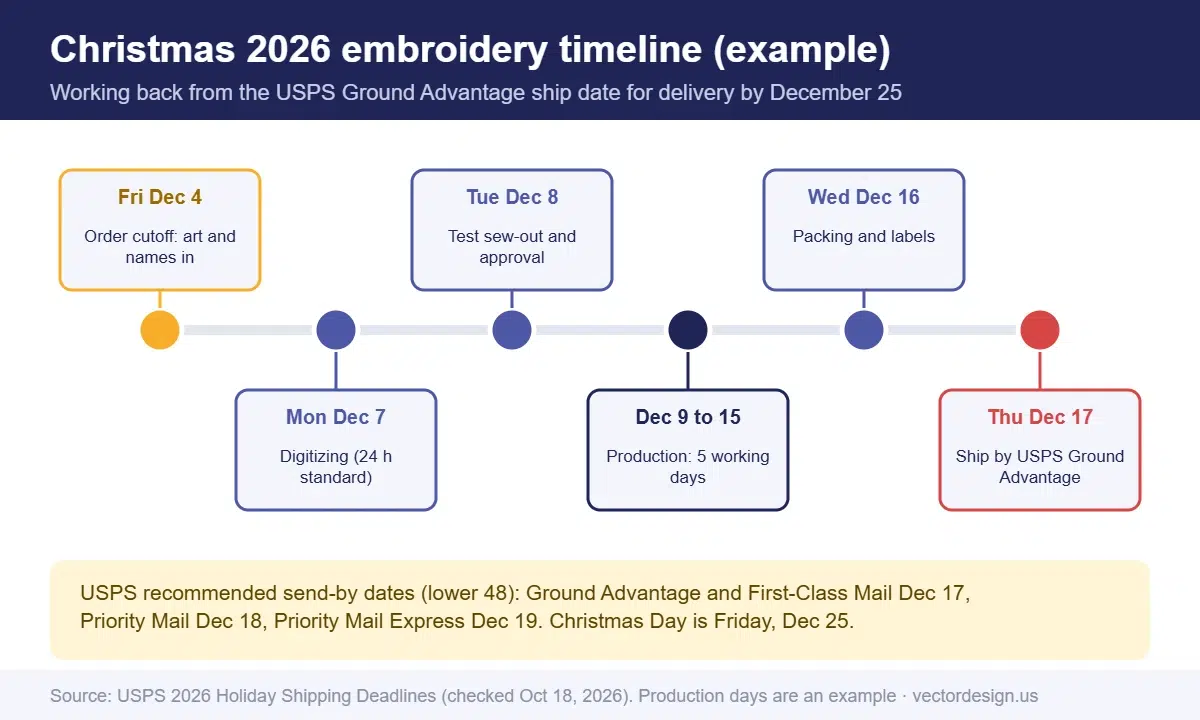
- Ship date: Thursday, December 17 (USPS Ground Advantage, lower 48).
- Packing and labels: finish by Wednesday, December 16. Allow one day.
- Production: allow five working days, from Wednesday, December 9 to Tuesday, December 15.
- Test sew-out (a sample stitched on the real fabric) and approval: Tuesday, December 8. One day for the stitch-out, photos and customer sign-off.
- Digitizing: Monday, December 7. Our standard digitizing turnaround is 24 hours, which still leaves no slack if a file needs a revision.
- Final artwork and name lists received: Friday, December 4. This is your customer deadline for personalized orders.
In this example, the shop tells customers “order personalized gifts by December 4.” A shop with more machines may push that later; a shop booked with corporate orders may need to pull it earlier. Publish the date on your site and in confirmation emails, and repeat it in early November.
| Step | Working days in the example | What can shorten it | What can stretch it |
|---|---|---|---|
| Artwork and name list | Customer-dependent | A form with fixed font and color choices | Missing spellings, late approvals |
| Digitizing | 1 | Reusing existing files for repeat logos | Revisions, complex designs, new fonts |
| Sew-out approval | 1 | Approving from the stitch simulation for repeat designs | New fabric, caps, small lettering |
| Production | 5 | More heads, fewer color changes | Many single-piece personalized items |
| Packing | 1 | Pre-printed labels | Gift wrap, inserts |
Only one day for digitizing in your plan?
Send your logos and name layouts early and we digitize them by hand for caps, towels, fleece and flats, in DST, PES, EXP or JEF, so your machines keep running.
From $10 per design. Expect a firm price by email after we check the artwork.
How long does an embroidery design take to stitch?
Sewing time is approximately the stitch count divided by the speed you actually run, in stitches per minute (spm). A commercial single-head machine such as Brother’s PRS100 is rated at up to 1,000 spm. A rated speed is a ceiling, not a promise, so the table also shows lower speeds for planning.
| Design stitch count | At 600 spm | At 800 spm | At 1,000 spm |
|---|---|---|---|
| 5,000 stitches | 8.3 min | 6.3 min | 5.0 min |
| 8,000 stitches | 13.3 min | 10.0 min | 8.0 min |
| 12,000 stitches | 20.0 min | 15.0 min | 12.0 min |
| 20,000 stitches | 33.3 min | 25.0 min | 20.0 min |
| 40,000 stitches | 66.7 min | 50.0 min | 40.0 min |
Trims and color changes add real time. According to Wilcom, a single trim costs roughly the run time of 70 stitches. A short name with letters spaced far apart can have a trim between every letter, so lettering that looks tiny on screen can take longer than expected.
Stitch count rises with design size and fill area. That is why a 3-inch left-chest name and a 10-inch jacket-back monogram can differ several times over in run time, even with the same lettering. Ask your digitizer for the stitch count with each file so you can schedule from real numbers. Our guide on embroidery digitizing cost explains how stitch count also drives pricing.
Which personalized gift designs are safe to digitize?
Names, initials and short dates are the core of holiday embroidery, and they are also where small errors show most. Use these rules when you set up your gift menu.
- Keep lettering above the font’s minimum size. Hatch lists 6 mm (about 0.25 in) as the minimum for fonts such as Tahoma, Times New Roman and Verdana. Its minimum is 12 mm for Edwardian Script and 25 mm (1 in) for its Fancy Monogram font.
- Watch lowercase letters. Hatch notes that lowercase lettering is about 70% of the height of uppercase, so a name sized by its capitals can be too small in its lowercase letters.
- Limit the font menu. Offer two or three fonts you know sew well at your sizes, rather than every script a customer finds online.
- Match the design to the fabric. On towels, Hatch recommends a water-soluble topping or a laydown stitch under lettering so the pile does not swallow the stitches.
- Plan placement and hoop size. A long name on a stocking cuff or a cap needs a different layout than the same name on a sweatshirt.
| Gift item | Typical personalization | Design rule to set | What the customer must supply |
|---|---|---|---|
| Christmas stocking | First name on the cuff | Single line, bold font, check the cuff height | Exact spelling, thread color |
| Towel or robe | Monogram or name | Topping or laydown stitch; avoid thin script | Initials in order, font choice |
| Beanie or cap | Name or short phrase | Cap-specific file; keep detail simple | Text, cap color, placement |
| Sweatshirt or fleece | Name, year, family label | Topping on high-pile fleece; size by lowercase height | Text, size, location |
| Ornament or patch | Name and year | Small area, so short text only | Text and year |
| Corporate gifts | Logo plus name | Logo digitized once, names as separate lettering | Logo file, name list in a spreadsheet |
For more design ideas for the season, see our Christmas and New Year embroidery designs. For backing choices on tricky fabrics, our embroidery stabilizer guide covers cut-away, tear-away and wash-away options.
Where do holiday digitizing jobs usually go wrong?
The busy season does not create new problems; it multiplies old ones. These are the issues our digitizing team sees most often in December files, with no exact counts, just patterns that repeat.
- Spelling errors in name lists. A name copied from a text message or a handwritten note is a common cause of re-sews. Ask customers to type names in a form and confirm them.
- Script names below the font minimum. They look elegant in the mockup and close up when stitched.
- One file used on caps and flats. Caps need their own file. SanMar’s decorator guide advises digitizing caps bottom-up and center-out, and not reusing a DST made for a flat polo.
- Late logo changes. A corporate client sends a “final” logo, then a new version after the sew-out. Lock the artwork before digitizing starts.
- Thread colors described in words. “Red” means different things to different people. Use thread chart numbers when the color matters.
How our production team checks this
- We confirm the item, fabric, finished size and machine format before digitizing starts.
- We check every name in the file against the client’s typed list, letter by letter.
- We play each design through the stitch simulation to review sequence, trims and small-letter density before delivery.
- Cap designs are built as cap files, not resized from a flat file.
- If lettering is below the chosen font’s minimum, we tell the client before digitizing rather than after the sew-out.
What should customers send for personalized orders?
Send customers a short form instead of an open text box. A form removes guessing and makes the list easy to hand to your digitizer.
- Exact text for each item, typed, with capital letters exactly as they want them.
- Font choice from your fixed menu.
- Thread color by chart number or from a short list.
- Item, size and color, such as “navy fleece, size M”.
- Placement, such as left chest, cuff or center back.
- Deadline confirmation, so the customer sees your cutoff date when ordering.
For corporate orders with many names, ask for a spreadsheet with one row per item. It cuts typing errors and lets you sort by garment and color before production. If a new logo is part of the order, our guide to digitizing a logo for embroidery explains what the digitizer needs from the client.
What can you offer customers after the cutoff?
Plan for late buyers before they arrive, because they will. A clear late-season offer keeps the sale without breaking the production schedule.
- Embroidered gift cards or certificates. Sell a printed card with a photo of a sample design, and stitch the real item in January. The buyer has something to put under the tree.
- Ready-stock designs. Stitch a small run of popular non-personalized items, such as a seasonal logo or a “Merry Christmas” cap, in November. They can ship the day they are ordered.
- Express shipping only. After your Ground cutoff, accept orders only with Priority Mail or Priority Mail Express, and only for designs you already have digitized.
- Pickup in store. Local customers can collect up to December 24, which removes the carrier from the timeline.
- A January promise. Some buyers are happy with “it arrives the first week of January” if you say so clearly at checkout.
Whatever you choose, put the rules in writing on the product page and in the confirmation email. A late-order policy that customers see before they pay prevents most of the angry emails in the week before Christmas.
How should rush requests be handled?
Decide your rush rules in October, not in the middle of a busy week. Set a limit on how many rush orders you accept per day, use only designs that are already digitized or very simple, and confirm the ship date in writing before taking payment. If a rush order needs new digitizing, check the digitizer’s turnaround first. Ours is 24 hours standard, with rush from 6 hours for an extra charge that may apply.
Frequently asked questions
When is the last day to ship Christmas embroidery orders in 2026?
USPS recommends December 17 for Ground Advantage and First-Class Mail, December 18 for Priority Mail and December 19 for Priority Mail Express, for delivery in the lower 48 before December 25.
How early should I stop taking personalized embroidery orders?
Work back from your ship date through packing, production, sew-out approval and digitizing. In our example plan, that puts the cutoff on December 4 for a small shop. Adjust it to your capacity.
What should customers send for a cap order?
Send the artwork, its size and position on the cap, the cap style and color, and the thread colors. Tell your digitizer it is for a cap, because SanMar’s decorator guide advises a cap-specific file instead of a flat one.
How long does a left-chest name take to stitch?
Divide the stitch count by your machine speed, then add trims and color changes. A 5,000-stitch design at 800 stitches per minute sews in about six minutes.
Can I let customers choose any font for a name?
It is safer not to. Offer two or three fonts you know sew well at your sizes. Many decorative scripts found online close up or lose detail at name sizes, and every new font needs testing, which is time you do not have in December.
Get holiday designs digitized on time
Tell us the item, size and deadline along with the logo or name layout, and we email back a firm price.
From $10 per design for embroidery digitizing.
- Exact quote by email before any work starts
- Prepayment by PayPal, Visa or Mastercard
- 24-hour standard delivery, rush from 6 hours (extra charge may apply), bulk timing confirmed after file review
- 2 free revisions and a 100% money-back guarantee
Sources
- USPS, 2026 Holiday Shipping Deadlines: usps.com: Holiday shipping dates (checked October 18, 2026)
- U.S. Office of Personnel Management, Federal holidays 2026 (Christmas Day: Friday, December 25): opm.gov: Federal holidays (checked October 18, 2026)
- Brother USA, PRS100 single-needle embroidery machine (1,000 spm maximum speed): brother-usa.com: PRS100 (checked October 18, 2026)
- Wilcom Help Center, Embroidery fonts vs printing fonts (trim adds about 70 stitches of runtime): help.wilcom.com: Embroidery fonts vs printing fonts (checked October 18, 2026)
- Hatch Embroidery, Choosing the right size embroidery lettering for your project: hatchembroidery.com: Choosing the right size embroidery lettering (checked October 18, 2026)
- SanMar U, How to Embroider Caps, Part 2 (cap files sew bottom-up and center-out): education.sanmar.com: How to embroider caps, part 2 (checked October 18, 2026)
- Hatch Embroidery, Top 10 tips for embroidering on towels: hatchembroidery.com: Tips for embroidering on towels (checked October 18, 2026)
Drafted with AI assistance and checked by our team against the sources listed above on October 18, 2026.