
Product Photo Style Guide Template for Consistent Listings


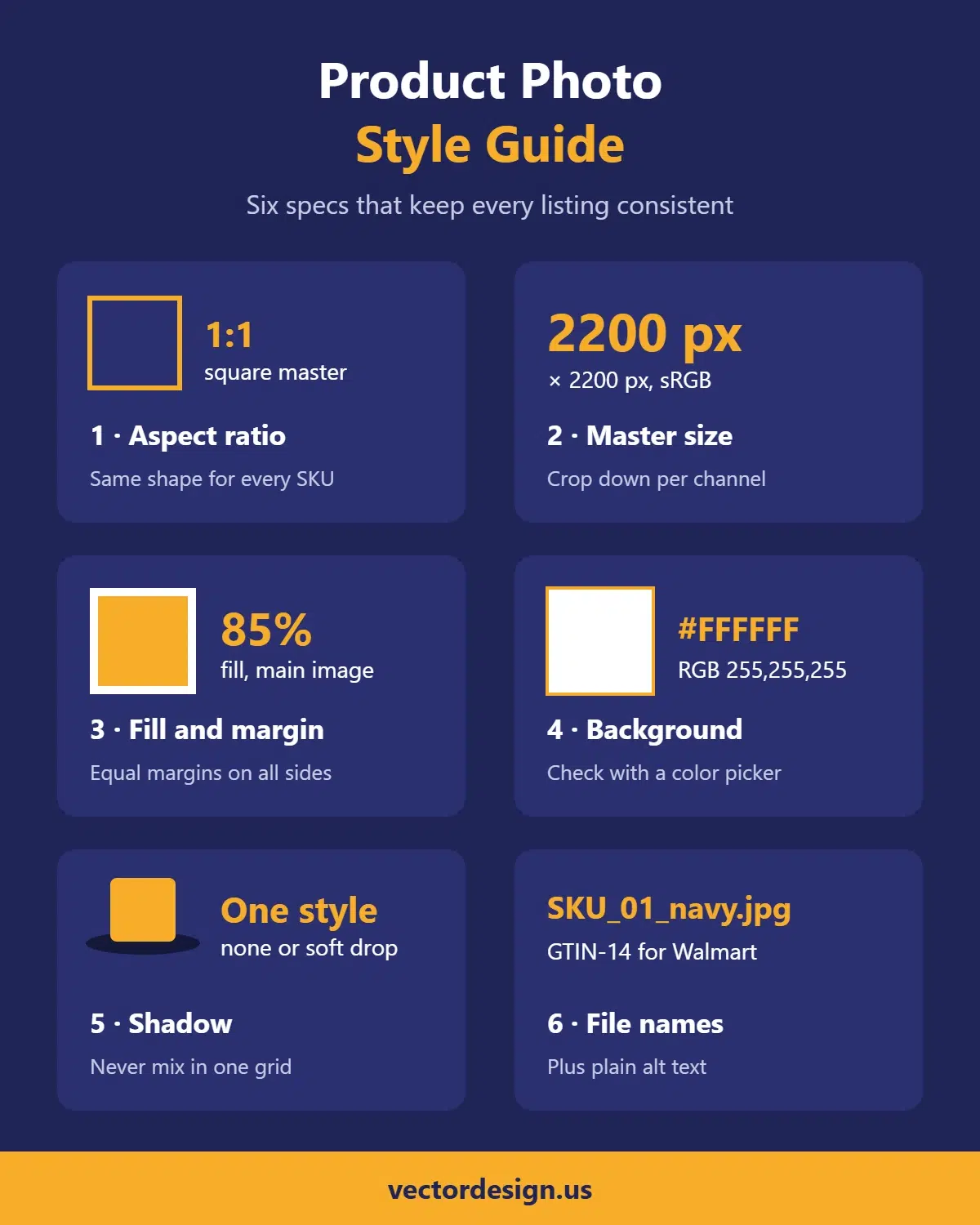
Short answer: A product photo style guide is a one-page spec that fixes aspect ratio, pixel size, product fill, background color, shadow, shot list, file format, color profile, file names and alt text. Send it to every photographer and editor so each SKU looks the same on Shopify, Amazon, Etsy and Walmart.
Key takeaways
- Pick one square master size that clears every channel you sell on, then crop down from it.
- Write numbers, not adjectives: “85% fill, RGB 255,255,255” beats “clean white look”.
- Copy the template below, fill the brackets, and send it before anyone shoots.
- Roll the guide out on a small batch first, then audit old listings against it.
- Planning a Q1 2027 catalog refresh? Finish the guide in December 2026 so January shoots start on spec.
On this page
What is a product photo style guide?
It is a short, written rulebook for how every product image must look and be delivered. Anyone who shoots or edits for you follows it, so a photo from March matches a photo from August.
Brand guides talk about mood. An e-commerce photo style guide template needs harder edges: what size, what background, how much margin, what file name.
Our photo editing workflow checklist covers the editing steps; the style guide sets their target.
Why do product images look soft or inconsistent on Shopify, even from high-res files?
Usually the files do not share one aspect ratio, so the theme crops or rescales each one differently. Big source files cannot fix a mismatch in shape.
In a Shopify Community thread, a merchant uploaded images up to 4472 px wide and still saw blur. The suggested fix was to change the theme’s image ratio setting and re-upload images at a matching ratio.
Shopify’s help page agrees: use a consistent aspect ratio so main images display at the same size. A style guide makes that rule stick across hundreds of SKUs.
What specs should your product photo style guide lock down?
Lock ten specs: aspect ratio, pixel size, fill, background, shadow, shot list, format, color profile, file names and alt text. Each row shows a house default, then what each marketplace states.
Headers link to each marketplace’s guidance, checked 2026-11-15; a dash means no stated rule. Amazon figures come from Amazon staff guidance in the Seller Forums, so confirm them in Seller Central before you shoot.
Swipe the table sideways on mobile →
| Spec | Suggested house rule | Amazon | Shopify | Etsy | Walmart |
|---|---|---|---|---|---|
| Aspect ratio | 1:1 square master | — | Use one consistent ratio for main images | First photo landscape or square; others match it | 1:1 (square) |
| Pixel size | 2200 × 2200 px master | Zoom works from 1,000 px on the longest side | Up to 5000 × 5000 px (25 MP); 2048 × 2048 px suggested for square | At least 2000 px wide and high recommended; first photo at least 635 px | 2200 × 2200 px; zoom needs at least 1500 × 1500 px |
| Product fill / margin | 85% fill on main image, equal margins | Main image: product covers at least 85% of the frame | — | Leave border so thumbnails can crop square, portrait or landscape | Crop tight to the item; avoid extra background space |
| Background | #FFFFFF (RGB 255,255,255) on main image | Main image: pure white background | — | Include one untouched photo showing the real item in a real setting | Main image: seamless white, RGB 255/255/255 |
| Shadow style | One style for all SKUs: none or soft natural drop | — | — | — | — |
| Angles / shot list | 7 shots in a fixed order (see template) | — | — | — | At least four images recommended |
| File format and size | JPEG for listings; PNG for cutouts | JPEG, TIFF or PNG | PNG first, then JPEG; under 20 MB | .jpg, .gif, .png, .svg, .heic; uploads above 1 MB can stall | JPEG, JPG, PNG, BMP; 5 MB or less |
| Color profile | sRGB, 8-bit | RGB or CMYK accepted | — | Etsy converts images to sRGB | RGB, 8 bits per pixel |
| Naming convention | SKU_view_color.jpg | Include the product identifier (ISBN, UPC, EAN or JAN) | — | — | 14-digit GTIN in the file name recommended |
| Alt text rule | Product + key attribute + view, no keyword lists | — | — | — | — |
Why 2200 px? It meets the Walmart figure and clears the Shopify and Etsy suggestions, so one master covers all four channels. For alt text and file names, Google’s image SEO guide asks for short descriptive names and warns against stuffing alt attributes with keywords. For the full channel rules, see our product image requirements for Amazon, Shopify, Etsy and Walmart.
Hundreds of SKUs from different photographers that never quite match?
We edit your product photos to your style guide: background, crop, margin, shadow and color, batch after batch.
From $0.50 per image · exact quote after file review · 24-hour standard delivery; bulk timing confirmed after file review
Copy-paste style guide template for photographers and editors
The template below is a fill-in spec sheet you can send to any photographer or editor. Paste it into a shared doc, replace every bracket, and attach it to each brief.
PRODUCT PHOTO STYLE GUIDE: [Brand name]
Version: [1.0]   Effective: [YYYY-MM-DD]   Owner: [Name, email]

1. CHANNELS
   [ ] Shopify  [ ] Amazon  [ ] Etsy  [ ] Walmart  [ ] Other: ____

2. MASTER FILE
   Aspect ratio: [1:1 square]
   Pixel size: [2200 x 2200 px]
   Color profile: sRGB, 8-bit
   Format: [JPEG, quality __] / [PNG for cutouts]
   Max file size: [__ MB]
   (Etsy: uploads above 1 MB can stall.
    Walmart: 5 MB or less. Shopify: under 20 MB.)

3. FRAMING
   Product fill, main image: [85]% of frame
   Margin: [equal on all sides / bottom-anchored]
   Camera height: [level with product center]
   Product facing: [straight on / turned __ degrees left]

4. BACKGROUND AND SHADOW
   Main image: [#FFFFFF, RGB 255,255,255]
   Secondary images: [#______ / lifestyle set]
   Shadow: [none / soft natural drop / reflection]
   Shadow direction and strength: [__]

5. SHOT LIST (deliver in this order)
   01 [Front hero on white]
   02 [45-degree angle]
   03 [Back]
   04 [Side profile]
   05 [Detail or texture close-up]
   06 [Scale or in-use]
   07 [Packaging / what's in the box]
   Variants: [one hero per color, same angle as 01]

6. EDITING RULES
   Color: [match the physical sample under __ light]
   Retouch: [remove dust, lint, scratches; keep real texture]
   Never: [change product color, add props not included,
           add text or badges to the main image]

7. FILE NAMING
   Pattern: [SKU]_[view no.]_[color].jpg
   Example: [TS1042_01_navy.jpg]
   Walmart uploads: [GTIN-14]_[view no.].jpg

8. ALT TEXT
   Pattern: [product] + [key attribute] + [view]
   Example: "Navy cotton crew-neck T-shirt, front view"
   No keyword lists.

9. DELIVERY AND SIGN-OFF
   Upload folder: [link]
   Turnaround: [__]
   Approver: [Name]   Send rejects to: [email]
Attach two or three approved “golden” images to the doc. People match a picture faster than a paragraph.
How do you create and roll out the style guide?
Create it from your channel rules, test it on a small batch, then make it the gate for every new image. If you plan a Q1 catalog refresh, finish the guide in December so January shoots and re-edits follow it from day one.
- List your channels. Note every marketplace and theme where the images will appear.
- Pull the strictest rules. Use the table above to pick a master size and background that pass everywhere.
- Check your theme crop. In Shopify, match the theme’s image ratio setting to your master ratio before you upload anything.
- Fill the template. Replace every bracket with a number or a clear choice. Delete lines that do not apply.
- Choose golden images. Approve one hero, one angle and one detail shot as the visual reference.
- Run a pilot batch. Send 10 to 20 SKUs through shooting and editing, then compare them side by side on a collection page.
- Fix the guide, not just the photos. Rewrite any rule people misread, and bump the version.
- Make it the gate. No image goes live until it passes the guide. Share the doc with every new freelancer or vendor.
What we see in production
- When a catalog mixes photographers, margins drift first, then shadows. One set has soft drop shadows, another has none, and the grid looks uneven.
- “White background” is often off-white in the file. A guide that names the exact value lets editors check it with a color picker instead of by eye.
- Variant images often break consistency because colors get shot on different days. Locking one hero angle for every color helps.
Shadow rules deserve their own page; see product photo shadows for Amazon, Shopify and Etsy. If your source images need clean cutouts first, do that before any shadow or crop work.
How do you audit existing listings for consistency?
Audit by viewing each collection as a grid and checking every image against the guide, one rule at a time. Fix top sellers with mismatched heroes first, ideally before new Q1 stock goes live.
- Do all main images share one aspect ratio and pixel size?
- Does the product fill the frame by the same amount, with the same margins?
- Is the main background a true white value, not light gray or cream?
- Is the shadow style the same across the whole collection?
- Does every listing have the full shot list, in the same order?
- Are files sRGB, within each channel’s size limit, and named by SKU or GTIN?
- Does every image have plain, descriptive alt text?
- Do variant photos use the same angle as the hero?
Log each failed SKU with the rule it broke; that list is your re-edit brief. Our guide to editing product photos walks through the fixes.
Frequently asked questions
What is the difference between a brand style guide and a product photo style guide?
A brand guide covers logo, fonts and tone. A product photo style guide covers measurable image specs: ratio, pixel size, fill, background value, shadow, shot order, file names and alt text. Photographers and editors can follow it without guessing.
What size should my master product photo be?
Pick one square size that meets every channel you sell on. A 2200 × 2200 px master meets the Walmart figure and clears the Shopify and Etsy suggestions. Check each channel’s current help page before you lock it in.
Should every channel use the same image?
Use the same master, then export per channel. Etsy wants at least one unedited photo on a real background, while Amazon and Walmart main images use white. A style guide can list these channel exceptions in one place.
Can I send my style guide to an editing service?
Yes. Send the filled template and two or three golden images with your files. We edit to your stated background, margin, shadow and naming rules, and you get an exact quote after file review.
Send your file, get an exact quote
- Exact quote by email before you pay (PayPal, Visa or Mastercard)
- 24-hour standard delivery; rush from 6 hours
- 2 free revisions
- 100% money-back guarantee
Product photo editing starts from $0.50 per image.
Sources
Sources checked 2026-11-15.
- Amazon Seller Forums (Amazon staff post): Product image requirements
- Amazon Seller Forums (Amazon staff post): Listings Lounge, product image requirements
- help.shopify.com: Product media types
- community.shopify.com: Why are my product images blurry despite high resolution?
- help.etsy.com: Requirements for images in your Etsy shop
- marketplacelearn.walmart.com: Product detail page image guidelines and requirements
- developers.google.com: Image SEO best practices