
Photo Restoration Cost: What You Pay and Why (2026)


Short answer: Photo restoration cost depends mainly on the damage. Thumbtack’s cost guide gives an average of $78 per job, with a typical range of $55 to $100. Fash’s 2026 guide runs from $35 to $85 per image for light wear to $250 to $500 or more for severe damage. Our own prices begin at $20 per image when damage is light.
On this page
Key takeaways
- Price follows damage: light dust and fading cost the least; missing areas, faces and colorizing cost the most.
- Published guides differ widely, because they mix local studios, freelancers and online services. Compare quotes on the same photo.
- Fash adds $25 to $100 or more for colorization on top of the base price.
- DIY costs time more than money: Photoshop is US$22.99 a month on an annual plan, and GIMP is free.
- A good quote names the exact price, the delivery time, the file you receive and the revision policy before you pay.
On this page
- How much does photo restoration cost in 2026?
- What makes one photo cost more than another?
- What does restoration cost by photo type?
- How much does photo colorization cost?
- Is DIY restoration cheaper than hiring a pro?
- How do you get an accurate restoration quote?
- What should a restoration quote include?
- What else could add to the bill?
- How do you budget for a box of family photos?
- Is professional restoration worth the cost?
- Frequently asked questions
- Sources
How much does photo restoration cost in 2026?
Most published price guides put a single restored photo somewhere between about $25 and $500, depending on the damage and the provider. The table brings the sources together. Each figure is copied from its source on the date shown.
| Source | What it covers | Price | Date |
|---|---|---|---|
| Thumbtack cost guide | Average job cost from local pros | $78 average; typical $55 to $100; full range $25 to $494 | Undated; checked October 18, 2026 |
| Fash cost guide: Basic | Minor surface wear | $35 to $85 per image | Guide dated August 4, 2026 |
| Fash cost guide: Medium | Moderate creasing, fading, color correction | $85 to $150 per image | August 4, 2026 |
| Fash cost guide: Advanced | Tears, heavy staining, background rebuilding | $150 to $250 per image | August 4, 2026 |
| Fash cost guide: Complex | Severe damage, missing sections, painted reconstruction | $250 to $500 or more per image | August 4, 2026 |
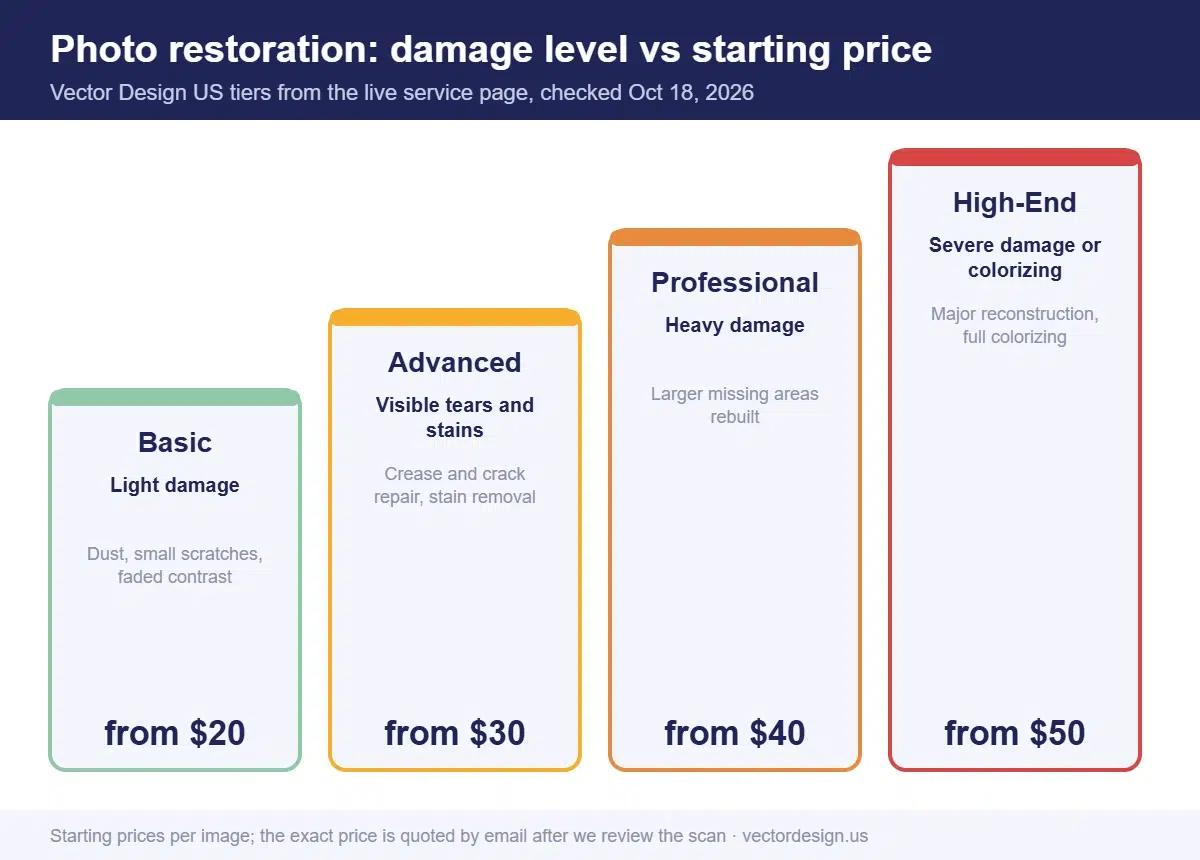
| Vector Design US: Basic | Light damage: dust, scratches, contrast and tone | From $20 per image | Live service page, October 18, 2026 |
| Vector Design US: Advanced | Visible tears and stains | From $30 per image | October 18, 2026 |
| Vector Design US: Professional | Heavy damage, larger missing areas rebuilt | From $40 per image | October 18, 2026 |
| Vector Design US: High-End | Severe damage, major reconstruction or full colorizing | From $50 per image | October 18, 2026 |
| DIY with Photoshop | Software only | US$22.99 a month on Adobe’s annual plan, paid monthly | Adobe plans page, October 18, 2026 |
| DIY with GIMP | Software only | Free | October 18, 2026 |
Why such a wide spread? Thumbtack and Fash summarize prices from the local professionals listed on their platforms, and neither explains how its averages are weighted. Online studios that work from scans, like ours, publish a starting price per image by damage level. Neither figure tells you what your photo will cost until someone looks at it.
What makes one photo cost more than another?
The amount of hand reconstruction drives the price. Software can clean dust quickly; rebuilding a torn face cannot be rushed. In our quotes, the price changes most often when a sharp scan reveals a crease or stain across a face that the customer’s phone preview did not show. These factors push a quote up or down.
| Factor | Lower cost | Higher cost |
|---|---|---|
| Damage type | Dust, light scratches, fading | Tears, stains, mold, missing pieces |
| Where the damage is | Background and edges | Faces, eyes, hands |
| How much is missing | Small corners or specks | Large areas that must be rebuilt |
| Number of people | One person | Group photos with many faces |
| Colorization | Not needed | Full colorizing, especially with many colors |
| Scan quality | Sharp, high-resolution scan | Blurry phone photo with glare |
| Extra edits | None | Removing a person, merging photos, changing background |
| Turnaround | Standard delivery | Rush delivery |
| Output | Screen use | Large print or canvas |
Damage across faces, or areas missing?
Send us the scan and we repair tears, stains, fading and missing areas by hand, so the people in the photo still look like themselves.
From $20 per image for light damage. A firm price comes back by email after we inspect the scan.
The scan is the factor you control. A sharp scan at the right resolution gives the restorer more real detail to work with, which means less guessing and less rebuilding. Our guide on how to restore old photos explains how to scan prints properly before you ask for quotes.
What does restoration cost by photo type?
The type of photo is a quick way to guess the tier before you ask for a quote. This table maps common family photos to our tiers. It is a starting point, not a quote: the exact price depends on what the scan shows.
| Photo | Typical damage | Usual starting tier | Starting price |
|---|---|---|---|
| Single portrait, faded with some dust | Light | Basic | From $20 per image |
| Snapshot torn in two, all pieces kept | Visible tear and crease | Advanced | From $30 per image |
| Group photo with water stains near faces | Heavy damage | Professional | From $40 per image |
| Wedding print with a missing corner, to be colorized | Severe damage or colorizing | High-End | From $50 per image |
Group photos usually cost more than portraits with the same damage, because every face needs its own careful work. A photo can also move up a tier if damage that looked minor turns out to run through a face.
How much does photo colorization cost?
Colorizing is usually priced as an add-on or as a higher tier, because it means painting color into each area by hand. Fash lists colorization as adding $25 to $100 or more to the base price, and puts standalone colorization at $50 to $150 per image. On our service page, colorizing sits in the High-End tier, from $50 per image.
What raises the cost of colorizing:
- Many people or objects, each needing its own skin, hair and clothing colors.
- Detailed backgrounds, such as gardens, streets or patterned wallpaper.
- Requests for specific colors, such as a known uniform or a family car, that need research or reference.
- Damage that must be repaired first, since colorizing comes after restoration.
Is DIY restoration cheaper than hiring a pro?
In money, yes. In time, often not. Software is cheap or free, but FamilySearch’s restoration series makes the point that restoration takes time, and that the real cost is in that time. It also warns that without the right tools and knowledge you risk ruining both the original and the digital copy.
| Option | Money | Time | Best for |
|---|---|---|---|
| GIMP | Free | Highest; no AI first pass | Light damage, people who enjoy learning |
| Photoshop (annual plan) | US$22.99/month, billed monthly on a yearly plan | Medium; Photo Restoration filter speeds up the first pass | Several photos, ongoing hobby |
| Phone app with AI restore | Varies | Low | Quick social posts with light damage |
| Online studio | Per image, by damage level | Low for you; delivery time instead | Damaged faces, important photos, gifts |
| Local studio | Varies; may include in-person scanning | Low for you | Originals that need careful handling |
A practical rule: try it yourself on photos with dust, scratches and fading. Pay a professional when faces are damaged, pieces are gone, or no other copy exists.
How do you get an accurate restoration quote?
Give the restorer what they need to judge the damage. A vague request gets a vague range; a good scan gets a fixed price.
- Scan the print at 300 dpi or more, or photograph it square-on in soft daylight with no glare.
- Send the whole photo, not a cropped section, so the restorer can see every problem.
- Point out what matters most, such as one person’s face or a date written on the back.
- Say how you will use it: screen, a 5 × 7 print, or a large canvas.
- Ask for colorizing separately, so you can compare the restored black-and-white price with the colorized price.
- Mention your deadline for gifts or events.
- Ask what is included: file formats, revisions and the refund policy.
If the quote is a range, ask what would move it to the top or bottom of that range. A clear provider will tell you before you pay.
What should a restoration quote include?
A quote should be specific enough that there is no surprise later. Check that it covers these points before you pay:
- The exact price for each photo, not “starting at.”
- The work included, such as repair only, or repair plus colorizing.
- Delivery time, and whether rush is available and at what extra cost.
- Revisions: how many rounds are included.
- Files delivered: format and resolution, and whether you get a print-ready version.
- Guarantee or refund terms if the result is not acceptable.
Our model is simple. You get an exact quote by email and prepay by PayPal, Visa or Mastercard. Standard delivery is 24 hours, with rush from 6 hours at an added cost that may apply. Revisions are included (two at no charge), with the 100% money-back guarantee applying to each order.
What else could add to the bill?
Restoration is often one step in a bigger request. These related edits are priced separately by most providers, so mention them up front:
- Removing or adding a person. Our guide on how to remove someone from a photo shows what that involves.
- Enlarging a small original. Upscaling a tiny print for a large frame has limits, which our guide to upscaling low-resolution images in Photoshop explains.
- Combining photos, such as adding a missing family member from another picture.
- Prints and framing, which are usually ordered separately from a print lab.
- Scanning, if you cannot scan the original yourself.
How do you budget for a box of family photos?
Sort the photos by damage before you ask for prices, then estimate each group at its tier. A shoebox of prints rarely needs the same work on every photo, and treating them all as “heavily damaged” inflates the budget.
- Make three piles: light damage (dust, fading, small scratches), visible damage (tears, stains, creases) and heavy damage (missing areas, damaged faces).
- Set aside the photos you want colorized, since colorizing sits in a higher tier.
- Scan everything, even the light pile, because scanning is the step that protects the photos.
- Multiply each pile by its starting price, then ask for an exact quote on the whole set.
Here is a worked example using our published starting prices. Say a family sends 10 photos: 6 with light damage, 3 with visible tears and 1 they want restored and colorized.
| Group | Photos | Starting price each | Starting subtotal |
|---|---|---|---|
| Light damage (Basic) | 6 | $20 | $120 |
| Visible tears and stains (Advanced) | 3 | $30 | $90 |
| Restore and colorize (High-End) | 1 | $50 | $50 |
| Estimate before review | 10 | $260 |
The exact quote can come in lower or higher than that estimate, because a “light” photo sometimes hides a damaged face and a “torn” photo sometimes tears through plain background only. That is why we review every scan before quoting.
How our production team checks this
- We look at the whole scan at 100% before quoting, so hidden damage near faces is priced in from the start.
- When a scan is too low in resolution or out of focus for the requested print size, we ask for a better one before quoting.
- We tell the client which tier a photo falls in and why, in the quote email.
- We confirm whether colorizing is wanted before work starts, since it changes the tier.
- Before delivery, a second editor checks the finished file at its print size.
Is professional restoration worth the cost?
It is worth it when the photo cannot be replaced and the damage is in the part that matters. Paying to fix dust on a photo you have three copies of makes little sense. Paying to rebuild the only photo of a grandparent’s face usually does.
Timing also matters. For a Christmas gift (Friday, December 25, 2026), send the scan by early December to leave room for review, revisions and printing. For an anniversary, Mother’s Day or a memorial service, allow the same margin. With 24-hour standard delivery the restoration is rarely the slow part; finding the original, scanning it and printing it usually take longer.
Frequently asked questions
How much does it cost to restore an old photo?
Published guides range widely. Thumbtack gives a $78 average with most jobs from $55 to $100. Fash’s 2026 guide runs from $35 to over $500 by damage level. Our prices start at $20 per image.
How much does photo colorization cost?
Fash lists colorization as a $25 to $100 or higher add-on, or $50 to $150 per image on its own. Our High-End tier, which includes full colorizing, starts at $50 per image.
Can I get one price for a whole box of photos?
Yes. Sort the photos by damage first, since a dusty print and a torn one fall into different tiers. Send scans of the whole set, and we reply with an exact quote for the batch, with timing confirmed after review.
Is it cheaper to restore photos myself?
Software is cheap: GIMP is free and Photoshop costs US$22.99 a month on an annual plan. The real cost is the time, especially for faces and missing areas.
Do I need to send the original photo?
Not to us. We work from a scan or a clear photo of the print, so the original stays safely with you.
Get an exact price for your photo
Share a scan, what matters most and where the photo will be used, and we reply with a firm price.
From $20 per image for photo restoration.
- Exact quote by email before any work starts
- Prepayment by PayPal, Visa or Mastercard
- 24-hour standard delivery, rush from 6 hours (extra charge may apply), bulk timing confirmed after file review
- 2 free revisions and a 100% money-back guarantee
Sources
- Thumbtack, Photo restoration cost guide: https://www.thumbtack.com/k/photo-restoration/ (checked October 18, 2026)
- Fash, How much does photo restoration cost? (dated August 4, 2026): https://fash.com/costs/photo-restoration-prices (checked October 18, 2026)
- Adobe, Photoshop plans and pricing (US): https://www.adobe.com/products/photoshop/plans.html (checked October 18, 2026)
- FamilySearch Blog, Restoring Damaged Photographs, Part 1: https://www.familysearch.org/en/blog/restoring-damaged-photographs-part-1 (checked October 18, 2026)
- Library of Congress, Personal Digital Archiving: Scanning (PDF): https://www.digitalpreservation.gov/personalarchiving/documents/PA_scanning.pdf (checked October 18, 2026)
Drafted with AI assistance and checked by our team against the sources listed above on October 18, 2026.