
How to Vectorize an AI-Generated Logo (ChatGPT, Midjourney) for Print

Short answer: To vectorize an AI-generated logo, clean and upscale the PNG, then auto-trace it in Illustrator or Inkscape, or redraw it with the Pen tool. Replace the AI lettering with a real font, cut the colors down to a few brand colors, and export AI, EPS, SVG and PDF. ChatGPT and Midjourney output raster images, not vectors.
Key takeaways
- OpenAI’s image API returns PNG, JPEG or WebP. Midjourney’s docs describe pixel upscales. Neither documents an SVG export.
- AI logos often carry fake lettering, wobbly strokes, gradients, noise and far too many colors. Fix these before or during tracing.
- Auto-trace is fast but rarely print-clean on AI art. A Pen-tool redraw takes longer and gives clean shapes for print, cutting and embroidery.
- Always retype the text with a licensed font. Never trace AI-made letters.
- The US Copyright Office says prompts alone do not make you the author. Human edits can be protected. Trademark rights come from using the mark.
On this page
AI logo tools are now a normal start for a new brand. A founder types a prompt into ChatGPT or Midjourney, picks a favorite, and sends the PNG to a print shop.
Then the trouble starts. The file is pixels, not shapes. It blurs on a banner, it can’t drive a vinyl cutter, and the letters often aren’t real letters. This tutorial shows how to turn that PNG into a print-ready vector file, and when it’s faster to have it redrawn.
Why do ChatGPT and Midjourney give you a PNG, not a vector?
Image generators create pixels, so what you download is a raster image. A raster image stores color values for a fixed grid of pixels. A vector file stores shapes as math (points, curves and fills), so it scales to any size with sharp edges.
- ChatGPT / OpenAI: OpenAI’s image API reference lists three output formats for its GPT image models: PNG, JPEG and WebP. SVG is not one of them. The ChatGPT Images help page covers text and transparent backgrounds, but not vector export.
- Midjourney: Its upscalers double the pixel size. A default 1:1 V7 image goes from 1024 × 1024 to 2048 × 2048 pixels. That is still a raster file. We found no SVG or vector export in Midjourney’s docs (checked October 27, 2026).
- Vector-first tools: Some newer tools can vectorize. Recraft’s docs describe turning raster images into SVG. Adobe Illustrator has a Concept to Vector feature that turns raster images into vector artwork. Their output still needs the checks below.
ChatGPT can also write SVG code as text. That code rarely matches the logo you picked. To check any file you get, see how to tell if a file is vector.
What defects do AI-generated logos usually have?
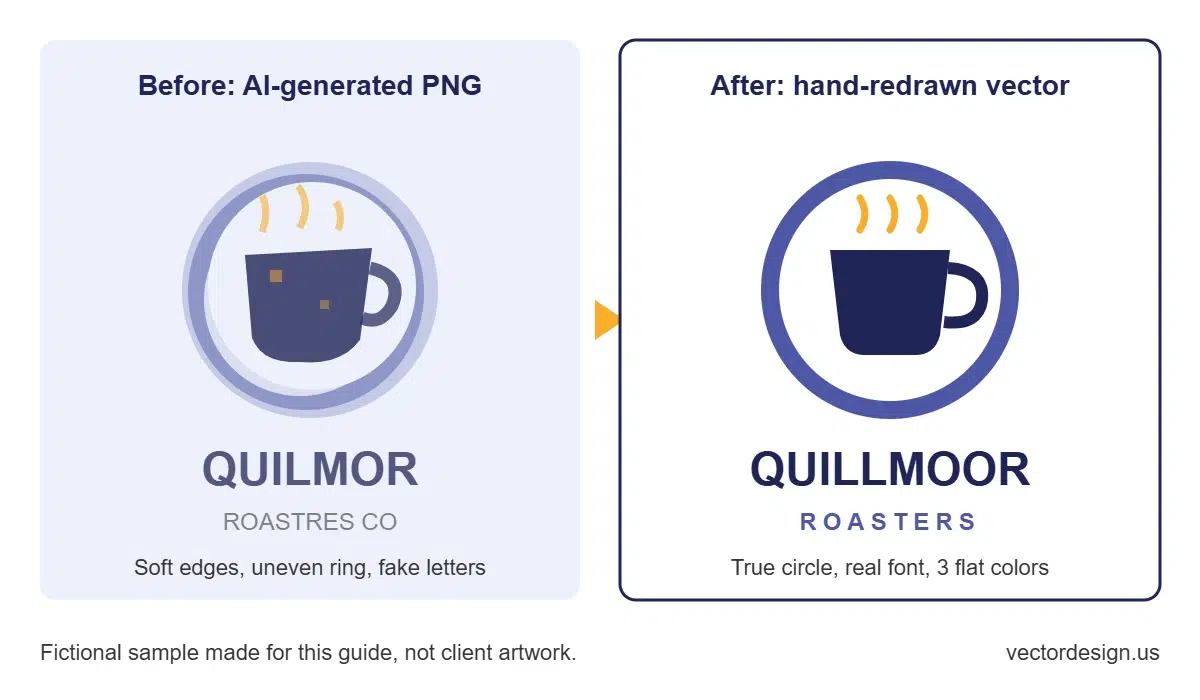
AI logos look finished at phone size but break down when you zoom in. Check for these defects before you trace.
| Defect | What it looks like | Why it matters for print | Fix |
|---|---|---|---|
| Garbled or fake lettering | Letters that are almost right, odd joins, made-up glyphs | Misspellings print forever; traced letters look lumpy | Retype with a real, licensed font |
| Inconsistent strokes | Line weights that swell and thin for no reason | Thin parts vanish on small items or in embroidery | Redraw with set stroke widths, then outline |
| Gradients and noise | Soft shading, grain, glow, texture | Traces into hundreds of tiny shapes; hard for screen print and cutting | Flatten to solid fills before tracing |
| Too many colors | Dozens of near-identical shades | Each extra color usually means another screen or thread change | Reduce to 1–4 brand colors |
| Asymmetry | A circle that isn’t round, uneven left and right sides | Looks off on signs and badges | Rebuild with shapes, guides and Reflect |
| Soft or haloed edges | Fuzzy outline, light fringe around the mark | Visible fringe on dark shirts; bad cut lines | Trace on a clean, high-contrast copy |
Swipe to see all columns →
Midjourney’s own text guide says short words and phrases give better results, and it suggests the Editor or Vary Region to fix small glitches. Plan to replace the lettering.
How do you vectorize an AI-generated logo, step by step?
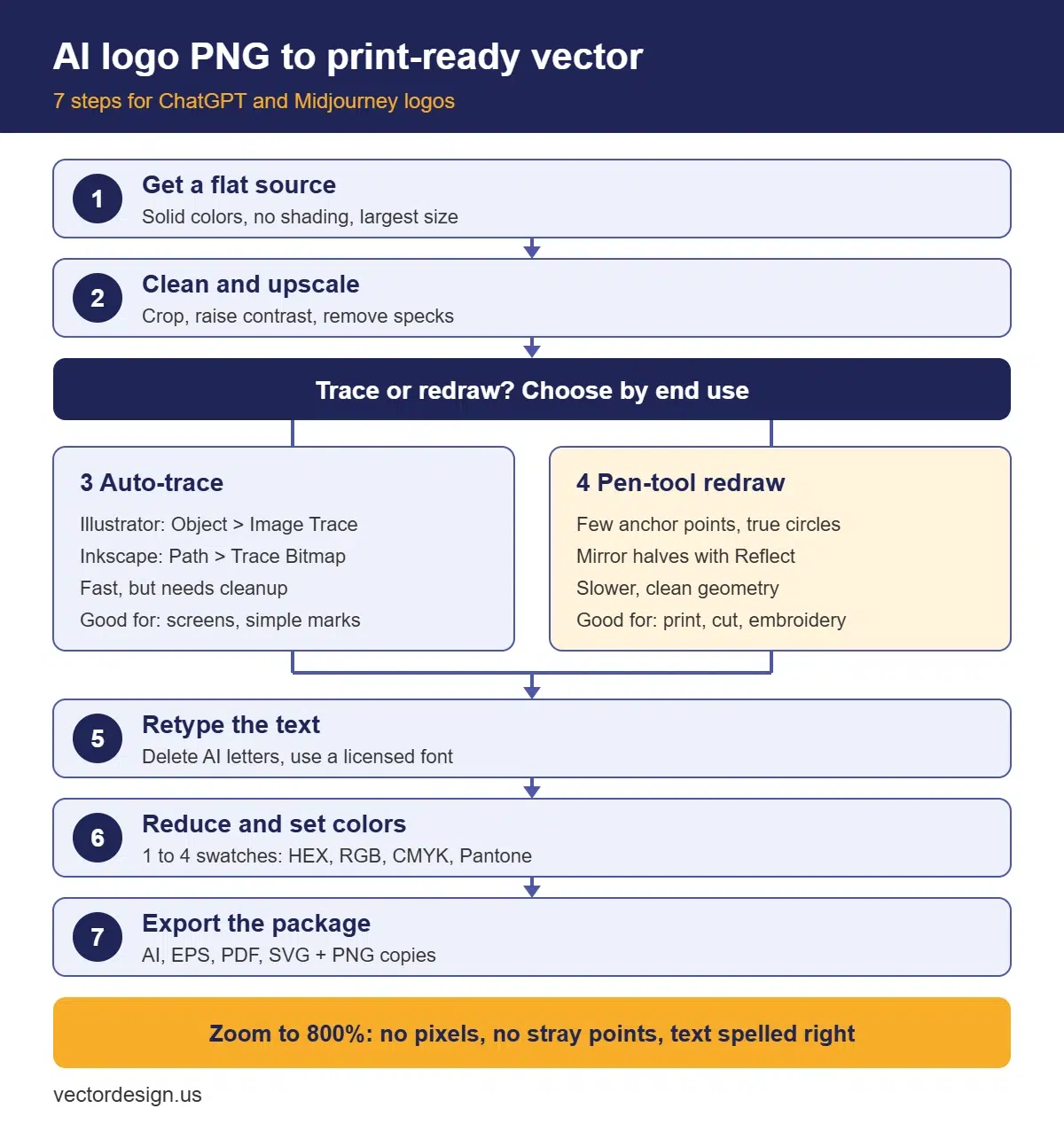
Clean the PNG first, trace or redraw the shapes, then rebuild the text and colors by hand. These seven steps work in Adobe Illustrator or free Inkscape.
Step 1: Get the cleanest source you can
Ask the AI tool for a flat version: solid colors, no shading, no texture, plain white background. Download the largest size it offers. In Midjourney, use the Subtle upscaler, which keeps the look closest to the original. The Creative upscaler adds new detail, and you don’t want that in a logo.
Step 2: Upscale and clean the PNG
In a photo editor, crop to the mark, raise contrast and remove stray specks and the background. If the file is small, double its size first so the tracer has more pixels to follow. Upscaling adds no real detail, it only gives cleaner edges to trace. If there’s a gradient, fill each area with one flat color. A clean, high-contrast source gives the tracer clean edges to follow.
Step 3: Auto-trace (fast route)
- Illustrator: place the PNG and select it. Run Object > Image Trace > Make for a one-click result, or open Window > Image Trace to pick a starting preset. Use Low Color for a flat multi-color mark and Black and White for a one-color mark.
- Tune the sliders until the edges look right. Then run Object > Image Trace > Expand, and the live trace becomes ordinary paths you can edit point by point.
- Inkscape: select the image, then choose Path > Trace Bitmap (Shift+Alt+B). Brightness cutoff works for one-color marks. Multiple scans keeps the colors, and each scan becomes its own stacked object.
- Zoom in to 800% and look at every curve and corner.
Inkscape’s tracing tutorial puts it plainly: no autotracer makes an exact copy. A trace gives you curves to work from, not a finished logo. On AI art you’ll usually see bumpy curves, extra anchor points and rounded corners that should be sharp.
Did your trace come out lumpy, with letters that don’t look right?
We redraw AI-generated logos by hand as clean vector shapes, and we retype the lettering with a real font. From $7 per logo · exact quote by email after we see the file · 24-hour standard delivery.
Step 4: Or redraw with the Pen tool (clean route)
Lock the PNG on a bottom layer at about 50% opacity. Trace over it with the Pen tool, using as few anchor points as you can. Build circles, rings and straight bars from the shape tools, so they’re actually round and straight. Use Reflect to mirror one half when the design should be symmetrical.
Our low-res logo to vector walkthrough shows this Pen-tool process step by step.
Step 5: Retype the text with a real font
Delete the traced letters. Type the brand name as live text in a font you are licensed to use, then match its size, spacing and position to the AI version. Illustrator’s Retype feature can help identify fonts in a raster image.
When the layout is final, convert the text to outlines in a copy of the file, so the printer doesn’t need the font.
Step 6: Reduce colors and set brand colors
Merge near-duplicate shades into a small palette, usually one to four colors. Save each one as a swatch. Record HEX and RGB for screens, CMYK for print, and a Pantone match if the printer uses spot colors. Make a one-color version too, for single-color jobs.
Step 7: Export the logo package
- AI: the editable master file.
- EPS: for older print, sign and promo workflows.
- PDF: what many printers prefer to receive.
- SVG: for web, Cricut and many laser programs.
- PNG: transparent copies for screens, exported from the vector.
For tool-by-tool settings in Illustrator, Inkscape and CorelDRAW, see our guide to converting raster images to vector graphics.
Auto-trace, AI vectorizer or manual redraw: which method fits your job?
Choose by end use. For screens and quick mockups, a trace is often enough. For print, cutting and embroidery, a manual redraw is the safest choice.
| Method | Time | Quality on AI art | Vinyl / laser cut | Embroidery prep | |
|---|---|---|---|---|---|
| Auto-trace (Image Trace, Trace Bitmap) | Minutes, plus cleanup | Bumpy curves, many points, traced fake letters | OK for simple flat marks | Risky: extra nodes and tiny gaps | Weak: shapes need simplifying |
| AI vectorizer tools (e.g. Recraft, Concept to Vector) | Minutes | Can be smoother than a basic trace; text is still not real type | Check colors and edges first | Check every path before cutting | Weak to fair |
| Manual Pen-tool redraw | Longest; depends on detail | Clean geometry, real fonts, set palette | Strong | Strong: closed, clean paths | Strong starting point for a digitizer |
| Hire a studio (us, or any vector service) | About a day standard | Hand-drawn, checked file package | Strong | Strong | Strong |
Swipe to see all columns →
Embroidery needs one more step. A vector file is not a stitch file. A digitizer turns the clean vector into DST or PES for your machine. Our embroidery digitizing service works from the same redrawn file.
Do you own an AI-generated logo, and can you trademark it?
You can usually use it, but copyright in raw AI output is limited, and trademark rights come from using the logo in business.
- Copyright: In its January 29, 2025 report, the US Copyright Office said prompts alone don’t make you the author. AI output can be protected only where a human has determined enough of the expressive elements, for example through creative changes or arrangement. A real redraw, new type and your own edits can count as human work. The raw generated image on its own may not be protected.
- Trademark: The USPTO defines a trademark as a word, phrase, symbol or design that identifies your goods or services. Rights start when you use it in business. Registration isn’t required, but federal registration gives broader rights.
- Tool terms: OpenAI’s terms assign Output rights to you, and also note that output may not be unique across users. Midjourney’s terms say you own the assets you create, but a company earning more than $1,000,000 a year needs a Pro or Mega plan to own them. Midjourney images are publicly viewable by default.
So search for similar marks before you print a lot of merchandise. This is general information, not legal advice. For a registration, talk to a trademark attorney.
What we see in production with AI logos
Most AI logos we receive need the same few fixes: new lettering, flat colors and true geometry. The files come to our designers from print shops, embroiderers and new business owners.
- The lettering is almost always rebuilt. A bent letter or missing crossbar often goes unnoticed until we point it out. Retyping with a real font is the single biggest quality change.
- Shading hides the real shape. Glows and soft shadows make a mark look rich on screen. Once we flatten them, the core shape is often simpler, and it prints much better at small sizes.
- “Round” things aren’t round. Rings, badges and shields drift out of shape in AI art. We rebuild them from true geometry, and the logo looks steadier straight away.
- Customers want a choice. Some want an exact copy of the AI look. Others want it tidied into a cleaner mark. We ask before we start, so the redraw matches what the brand needs.
The AI logos customers send often come as a screenshot from a chat window or a compressed web download, not the original file. Some arrive as a grid of four options, with a note saying which one to use and what the real business name is. Others already have a home-made trace that looks fine on screen but falls apart at shirt size.
We work from the largest copy the customer can find, and we ask which details matter to them before we redraw anything.
What should you check before sending an AI logo to a printer?
Run this checklist on the final file. If any line fails, fix it before you order proofs.
- The file is a real vector: AI, EPS, PDF or SVG with paths, not a PNG placed inside one.
- It stays sharp at 800% zoom, with no pixels or jagged edges.
- All text is spelled correctly, set in a licensed font, and outlined in the print copy.
- The palette is limited, with each color named as a CMYK or Pantone swatch.
- There are no gradients, glows or textures, unless the printer confirms they can print them.
- Shapes are closed, there are no stray points, and no tiny specks are left from tracing.
- Thin lines are still visible at the smallest print size you need.
- You have one-color and reversed (white) versions for dark items.
- You’ve done a basic trademark search on the name and mark.
Launching a new brand in January? Plan the files now
Signs, shirts and cards for a new-year launch all need the vector file first. This timeline leaves room for proofs.
- By early December: pick the final AI concept and get it vectorized, with the text retyped.
- Mid-December: approve the brand colors and send the files to your printer, embroiderer and sign maker for proofs.
- Late December: approve the proofs. Holiday closures can slow production, so ask each vendor for its cutoff date.
- January: launch with the same master file on every item.
Want to budget this? Our vector conversion cost guide explains what changes the price of a redraw.
AI logo vectorizing FAQ
Can ChatGPT make a vector logo?
Not as an image download. OpenAI’s image models output PNG, JPEG or WebP, which are raster files. ChatGPT can write SVG code as text, but that code rarely matches the logo you generated. For print, trace or redraw the image as a vector.
Can I trademark an AI-generated logo?
Trademark rights come from using a mark to identify your goods or services, and the USPTO doesn’t require registration for those rights. Copyright in raw AI output is limited, though, and similar marks may exist. Check before you invest, and ask a trademark attorney. This is not legal advice.
Why does my AI logo look blurry when printed?
The PNG has a fixed number of pixels. A 2048-pixel-wide image stretched across a banner spreads each pixel over a large area, so the edges go soft. A vector version has no pixels, so it prints sharp at any size.
What file does a printer need for my logo?
Most printers ask for a vector PDF, AI or EPS, with text outlined and colors set as CMYK or Pantone swatches. Cutters and many laser programs also take SVG. Ask your printer for their spec sheet, since requirements vary.
Is Image Trace good enough for an AI logo?
Sometimes, for a simple flat mark used on screens. AI art usually has noise, uneven strokes and fake letters, so the trace needs cleanup. For print, vinyl cutting or embroidery, a Pen-tool redraw with retyped text is more reliable.
Send your AI logo, get an exact quote
Send us the PNG from ChatGPT, Midjourney or any AI tool, and we’ll redraw it as a clean, print-ready vector with real fonts and a set palette. From $7 per logo.
- Exact quote by email before you pay (PayPal, Visa or Mastercard)
- 24-hour standard delivery, rush from 6 hours
- 2 free revisions
- 100% money-back guarantee
Sources
Sources checked October 27, 2026:
- OpenAI: Images API output formats
- OpenAI Help: Images in ChatGPT
- OpenAI: Terms of use
- Midjourney: Upscalers
- Midjourney: Text generation
- Midjourney: Terms of service
- Adobe: Vectorize an image in Illustrator
- Adobe Help: Image Trace presets
- Adobe Help: Concept to Vector
- Adobe Help: Retype
- Inkscape: Tracing tutorial
- Inkscape manual: Tracing an image
- Recraft docs: Vectorizing
- US Copyright Office: AI report, Part 2
- USPTO: What is a trademark?
Drafted with AI assistance and checked by our team against the sources listed above on October 27, 2026.